
Ad Scenario
On the App - Ad Scene page, you can create and edit ad scenes. Before creating an ad scene, you must first create an app and at least one Ad Placement.
On the Ad Scene page, you can:
- Add ad scenes
- View ad scene data
1. Ad Scene Introduction
(1) View SDK loading and impression ad conversion data to improve revenue
By using the ad scene feature, you can view the data of each ad loading and impression flow in the SDK on the Funnel Analysis Report, determine whether ad settings are reasonable, analyze optimization opportunities for each flow conversion, and improve conversion to boost revenue.
(2) Reduce Ad Placement configuration costs
Developers usually use different Ad Placements to distinguish data for different ad scenarios. This effectively differentiates impression and revenue data under each scenario, but also increases operational costs (needing to maintain Ad Source configurations for multiple Ad Placements).
The Taku platform supports creating multiple ad scenes under a single Ad Placement, effectively differentiating impression and click data under different ad scenarios, reducing the cost of configuring Ad Placements.
2. Ad Scene Integration Process
(1) When the current Ad Placement corresponds to only one ad scene:
After adding the ad scene arrival code, Taku will provide the following core metrics in the Comprehensive Report and Funnel Analysis Report, offering more complete analysis data for your ad monetization:
When the SDK reaches the ad scene, call Taku SDK's entryAdScenario() method. You may skip passing the ad scene ID, and the data will be classified under the default ad scene.
(2) When the current Ad Placement corresponds to multiple ad scenes and you need to differentiate impression and click data across different ad scenes:
- Create ad scenes in the Taku backend and optionally customize the ad scene ID.
- Accurately add the ad scene arrival code in the app (call Taku SDK's
entryAdScenario()method and pass the respective ad scene IDs). - Pass the scenarioId in the
showmethod when displaying the ad.
3. Timing for Calling Ad Scene Arrival
Based on different ad types and your app's ad logic, you can call Taku SDK to add the ad scene arrival code within the app.
3.1 Rewarded Video
Refer to the following examples for calling the ad scene arrival method:
| App Type | Ad Name | Ad Flow | Timing of Ad Scene Arrival Call |
|---|---|---|---|
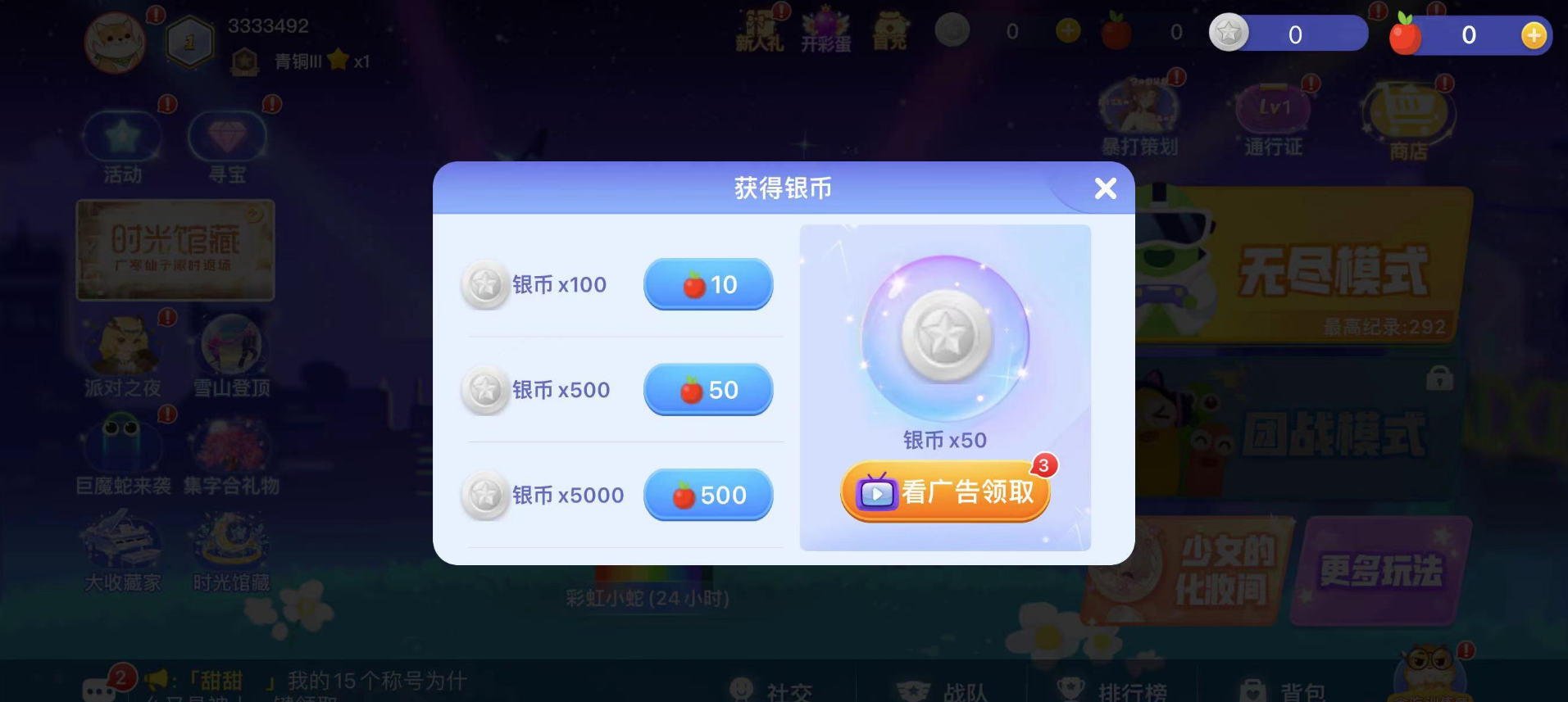
| Game | Rewarded Video Claim Reward | Enter Game -> Click Stamina/Currency entry -> Pop up "Watch Ad to Get Reward" popup -> Click button to watch Rewarded Video | Pop up "Watch Ad to Get Reward" popup |
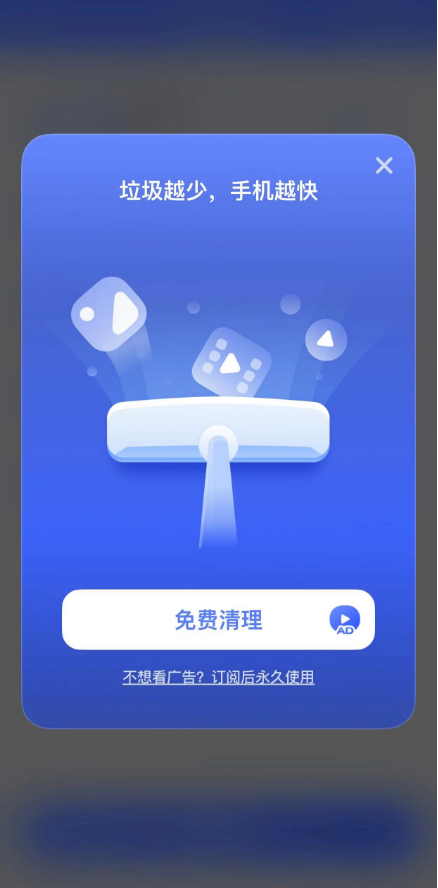
| App | Watch Video to Clean Junk | Enter App -> Enter Clean Junk feature -> Scan junk -> Click Clean Now -> Pop up "Watch Ad to Clean Junk" popup -> Click button to watch Rewarded Video | Pop up "Watch Ad to Clean Junk" popup |
Game Rewarded Video Claim Reward:
App Watch Video to Clean Junk:
3.2 Interstitial (Full Screen / Half Screen)
Refer to the following examples for calling the ad scene arrival method:
| App Type | Ad Name | Ad Flow | Timing of Ad Scene Arrival Call |
|---|---|---|---|
| Game | Level Complete Interstitial | Enter Game -> Enter Level -> Level Complete popup -> Click Next Level / Return to Level page button -> Interstitial appears -> Enter next level / Level page | Level Complete popup |
| App | Cleanup End Interstitial | Enter App -> Enter Clean Junk feature -> Scan junk -> Click Clean Now -> Cleaning animation -> Full screen Interstitial appears -> Cleanup result page | Cleaning animation |
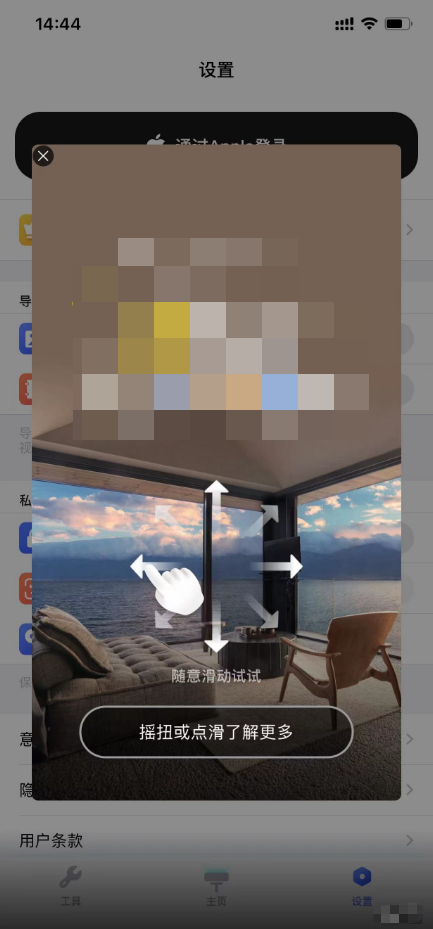
| App | Page Switch Interstitial | Enter App -> Homepage -> Click other features on homepage tab -> Arrive at other feature page -> Interstitial popup appears | Arrive at other feature page |
App Page Switch Interstitial:
3.3 Native / Feed
Refer to the following examples for calling the ad scene arrival method:
| App Type | Ad Name | Ad Flow | Timing of Ad Scene Arrival Call |
|---|---|---|---|
| Game/App | Check-In Popup Native Ad | Enter Game/App -> Check-in popup appears -> Display Native Ad below check-in popup | Check-in popup appears |
| App | Page Native Ad | Enter App -> Enter feature page / long list page -> Native Ad embedded in page | Enter feature page / long list page |
3.4 Banner
Refer to the following examples for calling the ad scene arrival method:
| App Type | Ad Name | Ad Flow | Timing of Ad Scene Arrival Call |
|---|---|---|---|
| Game/App | Banner Below Popup | Enter Game/App -> Message popup / Feature popup appears -> Display Banner below popup | Message popup / Feature popup appears |
| Game/App | Fixed Banner | Enter Game/App -> Enter level page / novel reading page etc. -> Display fixed Banner at bottom of page | Enter level page / novel reading page etc. |
Banner ads support both preloaded and non-preloaded modes, and the ad scene can be called on the above pages. If Banner auto-refreshes, the ad scene arrival data will be less than the impression data.
3.5 Splash
Refer to the following examples for calling the ad scene arrival method:
| App Type | Ad Name | Ad Flow | Timing of Ad Scene Arrival Call |
|---|---|---|---|
| Game/App | Splash Ad | Enter Game/App -> Display company logo page -> Display Splash Ad | Display company logo page; if there is no logo page and the app launches directly, you can call the ad scene upon entering the Game/App, or skip calling the ad scene |
4. Creating Ad Scenes and Obtaining Ad Scene IDs
If you need to use multiple ad scenes to differentiate data, you can create ad scenes in the backend and obtain the ad scene IDs.
(1) App -> Select the corresponding app -> View Ad Placement list -> Scene Management
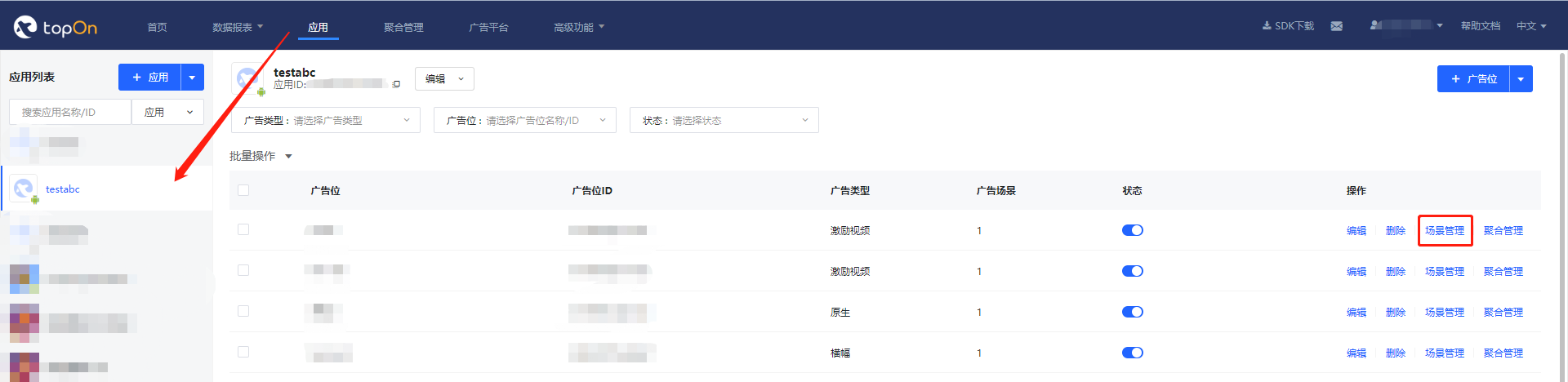
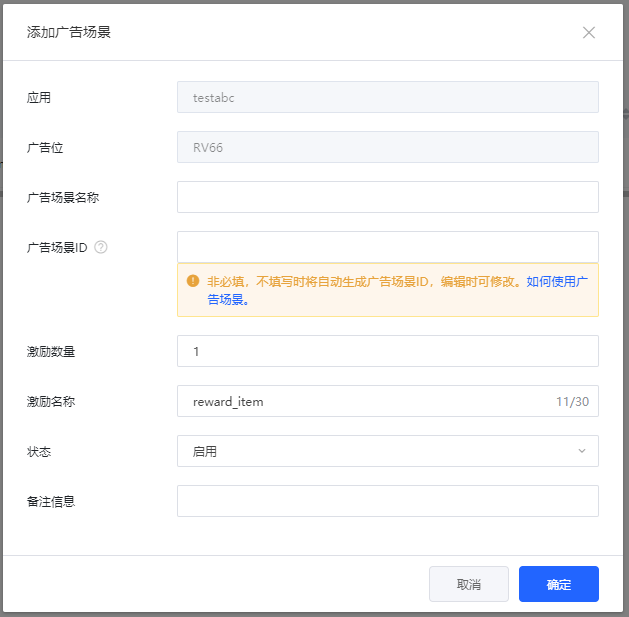
(2) Click Add Ad Scene
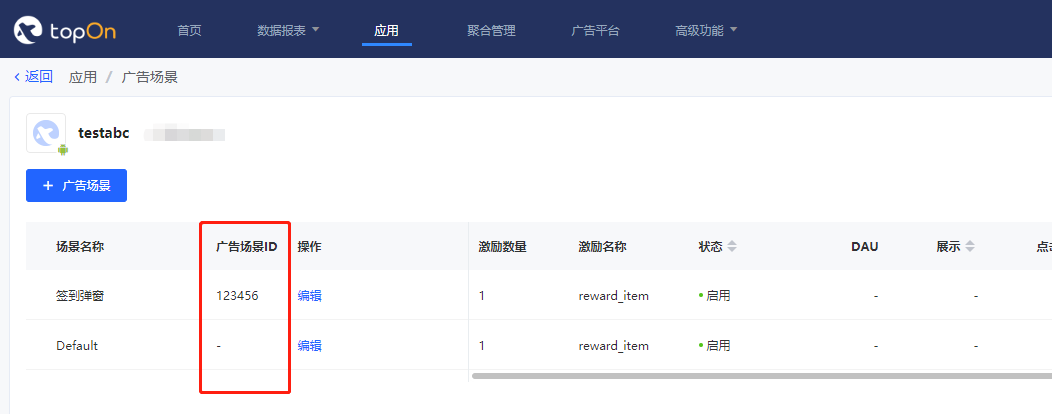
- Each Ad Placement has a Default scene. The default ad scene ID is "", and when calling the ad scene arrival method without passing an ad scene ID, the data will be classified under the default scene.
- You can customize the ad scene ID (supported by Taku SDK v6.2.48 and above), making it easier for developers to differentiate ad scenes during integration; if no ad scene ID is filled in, one will be auto-generated.
- For Rewarded Video ads, you can add reward information (reward name and reward amount) in the ad scene. The reward information will be called back to the developer. For details, refer to iOS - Callback Information and Android - Callback Information.
(3) View the scene list and obtain the ad scene ID to provide to the development team for integration.
5. Ad Scene Integration Code Samples
5.1 Taku Android SDK Code Samples
| Ad Type | Sample Code |
|---|---|
| Rewarded Video | View |
| Interstitial | View |
| Splash | View |
| Native | View |
| Banner | View |
5.2 Taku iOS SDK Code Samples
| Ad Type | Sample Code |
|---|---|
| Rewarded Video | View |
| Interstitial | View |
| Splash | View |
| Native | View |
| Banner | View |
5.3 Notes
(1) If the passed ad scene ID is incorrect or does not belong to the current Ad Placement, Taku will count that data under the Default scene.
(2) If no ad scene ID is passed in the entryAdScenario() or Show() methods, Taku will count that data under the Default scene.
(3) If a paused ad scene ID is passed in the entryAdScenario() or Show() methods, Taku will count that data under the Default scene.
(4) Taku SDK version support for ad scenes by ad type:
| Taku SDK Version | Ad Types Supporting Ad Scenes |
|---|---|
| >=5.4.7 | Rewarded Video, Interstitial |
| >=5.7.9 (5.7.09) | Rewarded Video, Interstitial, Native, Banner, Splash |
Taku backend custom ad scene ID supported version: >= v6.2.48
6. Viewing Ad Scene Data
6.1 Ad Scene Data Reports
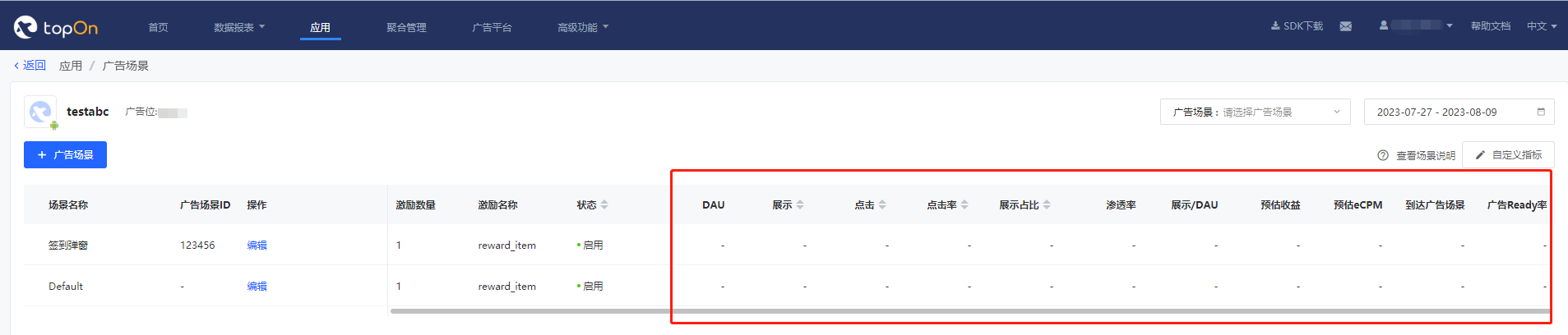
You can view data for each ad scene of a specific Ad Placement in Ad Scene and Reports.
6.2 Funnel Analysis Report
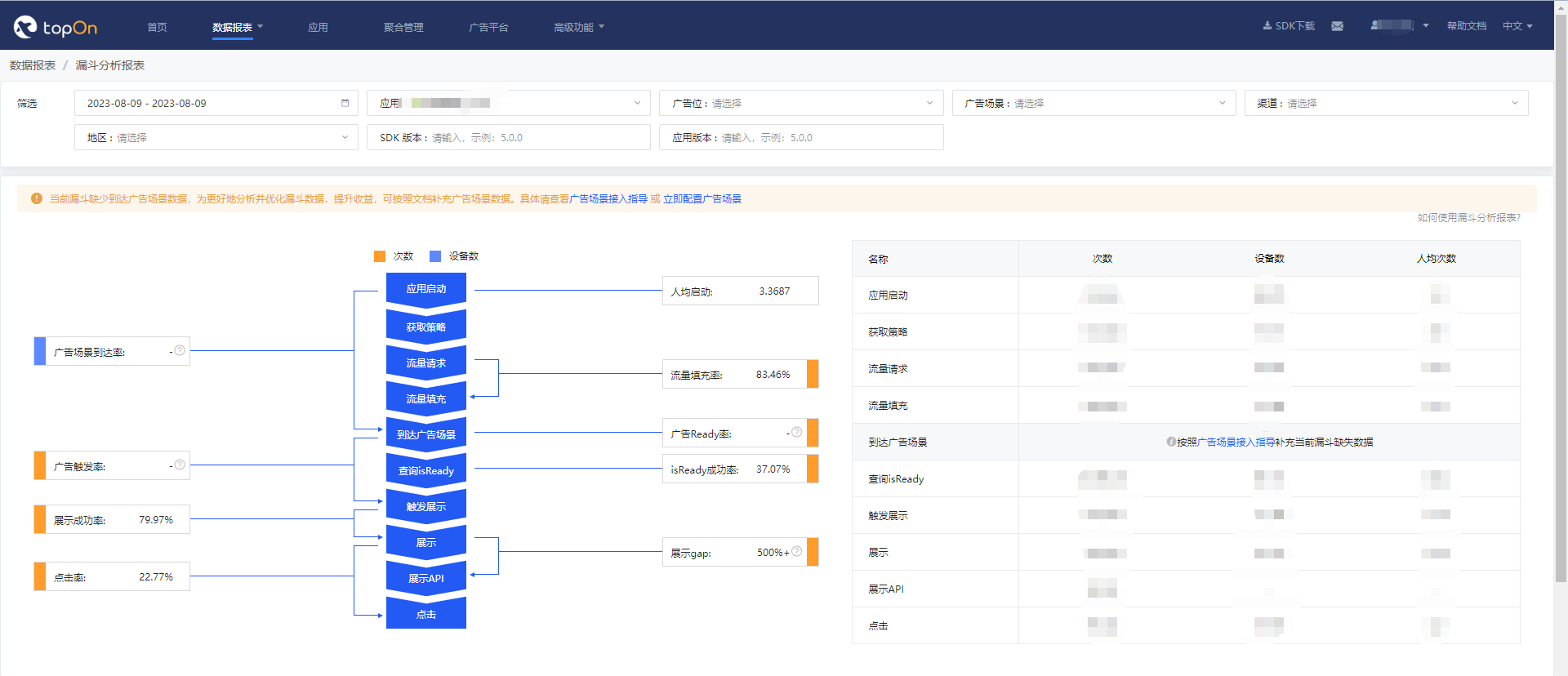
You can view the app's funnel analysis data in the Funnel Analysis Report.
;}.cls-2{fill:%230868f7;}.cls-3{fill:url(%23未命名的渐变_44);}.cls-4{fill:%23333;}%3c/style%3e%3clinearGradient%20id='未命名的渐变_8'%20x1='33.73'%20y1='100.61'%20x2='-0.03'%20y2='-1.06'%20gradientUnits='userSpaceOnUse'%3e%3cstop%20offset='0'%20stop-color='%237ae9fb'/%3e%3cstop%20offset='0.67'%20stop-color='%232b90f8'/%3e%3cstop%20offset='1'%20stop-color='%230868f7'/%3e%3c/linearGradient%3e%3clinearGradient%20id='未命名的渐变_44'%20x1='27.86'%20y1='18.67'%20x2='68.36'%20y2='22.22'%20gradientUnits='userSpaceOnUse'%3e%3cstop%20offset='0'%20stop-color='%235ac7f2'/%3e%3cstop%20offset='1'%20stop-color='%230868f7'/%3e%3c/linearGradient%3e%3c/defs%3e%3cpath%20class='cls-1'%20d='M29,28.74V81.91l-9.51-3.68v0L8.52,74A7.17,7.17,0,0,1,4,67.32V24.54A3.76,3.76,0,0,1,9.08,21Z'/%3e%3cpath%20class='cls-2'%20d='M68.09,78.07a13.15,13.15,0,0,1-17.9,12.06L29,81.91h0V28.74L50.19,37A13.17,13.17,0,0,0,68.08,25.3h0Z'/%3e%3cpath%20class='cls-3'%20d='M68.08,25.3a13.19,13.19,0,0,1-6.73,10.87A13.09,13.09,0,0,1,50.19,37L29,28.74V6A3.76,3.76,0,0,1,34.1,2.52l25.59,9.91A13.22,13.22,0,0,1,68.08,25.3Z'/%3e%3cpath%20class='cls-4'%20d='M129.06,81.76a4.33,4.33,0,0,1-3.19-1.31,4.4,4.4,0,0,1-1.31-3.24V56.86H97.65V77.21a4.36,4.36,0,0,1-1.35,3.2A4.68,4.68,0,0,1,93,81.76a4.32,4.32,0,0,1-3.19-1.31,4.37,4.37,0,0,1-1.32-3.24V27.27A4.58,4.58,0,0,1,89.83,24a4.59,4.59,0,0,1,7.82,3.27V48.15h26.91V27.27A4.58,4.58,0,0,1,125.91,24a4.59,4.59,0,0,1,7.82,3.27V77.21a4.37,4.37,0,0,1-1.36,3.2A4.65,4.65,0,0,1,129.06,81.76Z'/%3e%3cpath%20class='cls-4'%20d='M163.77,81.66c-6.57,0-11.76-1.92-15.44-5.7s-5.54-9.07-5.54-15.74a26.76,26.76,0,0,1,2.09-10.43,17.72,17.72,0,0,1,6.67-8.06,19.15,19.15,0,0,1,10.68-2.95,19,19,0,0,1,10.46,2.8,18.7,18.7,0,0,1,6.55,7.36,22.53,22.53,0,0,1,2.36,10.28A4.51,4.51,0,0,1,177,63.77H152.23a10.8,10.8,0,0,0,3.49,6.65c2,1.68,4.88,2.52,8.66,2.52a22.25,22.25,0,0,0,7.54-1.21c.74-.3,1.55-.67,2.37-1.07a3.75,3.75,0,0,1,1.84-.4,4.09,4.09,0,0,1,3,1.15,4,4,0,0,1,1.12,3,4.38,4.38,0,0,1-2.58,3.82,32.34,32.34,0,0,1-6.36,2.61A28.67,28.67,0,0,1,163.77,81.66ZM172.4,55.9a9.72,9.72,0,0,0-1.63-4.56A9.9,9.9,0,0,0,167,48a10.38,10.38,0,0,0-4.64-1.14,12,12,0,0,0-4.77,1.06,9.54,9.54,0,0,0-4.89,5.66,11.78,11.78,0,0,0-.51,2.3Z'/%3e%3cpath%20class='cls-4'%20d='M193,81.64a4.49,4.49,0,0,1-4.51-4.55V27.28A4.58,4.58,0,0,1,189.84,24a4.48,4.48,0,0,1,3.28-1.36A4.36,4.36,0,0,1,196.35,24a4.46,4.46,0,0,1,1.31,3.31V77.09a4.34,4.34,0,0,1-1.35,3.2A4.67,4.67,0,0,1,193,81.64Z'/%3e%3cpath%20class='cls-4'%20d='M263.79,81.71a5.7,5.7,0,0,1-4.2-1.74,5.76,5.76,0,0,1-1.73-4.19V27.37a4.58,4.58,0,0,1,1.35-3.27A4.59,4.59,0,0,1,267,27.37V72.53h24a4.58,4.58,0,0,1,3.27,7.82A4.66,4.66,0,0,1,291,81.71Z'/%3e%3cpath%20class='cls-4'%20d='M424.48,81.74a4.71,4.71,0,0,1-2.71-.88,5.43,5.43,0,0,1-1-1l-.07-.09-12.41-17-5.41,5v9.44a4.31,4.31,0,0,1-1.36,3.19,4.66,4.66,0,0,1-3.3,1.36A4.29,4.29,0,0,1,395,80.42a4.36,4.36,0,0,1-1.32-3.23V27.37A4.58,4.58,0,0,1,395,24.1a4.52,4.52,0,0,1,6.58.12,4.54,4.54,0,0,1,1.24,3.15V56.31l17.72-16.38.05,0a4.8,4.8,0,0,1,2.94-1.11,4.4,4.4,0,0,1,3.27,1.2,4.57,4.57,0,0,1,1.2,3.27,4.44,4.44,0,0,1-.77,2.33,7.45,7.45,0,0,1-1.43,1.65l-11,9.64,13.34,17.68a5,5,0,0,1,1,2.71,4.12,4.12,0,0,1-1.36,3.24A4.64,4.64,0,0,1,424.48,81.74Z'/%3e%3cpath%20class='cls-4'%20d='M317.93,81.76a21.5,21.5,0,1,1,21.17-21.5A21.37,21.37,0,0,1,317.93,81.76Zm0-34.1a12.61,12.61,0,1,0,12.42,12.6A12.52,12.52,0,0,0,317.93,47.66Z'/%3e%3cpath%20class='cls-4'%20d='M212.18,101.22a4.12,4.12,0,0,1-3.05-1.26,4.17,4.17,0,0,1-1.26-3.1V43.34a4.37,4.37,0,0,1,1.3-3.14,4.26,4.26,0,0,1,3.13-1.3,4.19,4.19,0,0,1,3.1,1.26,4.32,4.32,0,0,1,1.26,3.16,20.77,20.77,0,0,1,13-4.54,21.51,21.51,0,0,1,0,43,20.51,20.51,0,0,1-13-4.57V96.86a4.15,4.15,0,0,1-1.3,3.06A4.5,4.5,0,0,1,212.18,101.22Zm17.43-53.63c-6.23,0-12.93,4.11-12.93,12.72a12.73,12.73,0,0,0,25.46,0A12.71,12.71,0,0,0,229.61,47.59Z'/%3e%3cpath%20class='cls-4'%20d='M365.76,81.76a21.5,21.5,0,1,1,21.18-21.5A21.37,21.37,0,0,1,365.76,81.76Zm0-34.1a12.61,12.61,0,1,0,12.42,12.6A12.52,12.52,0,0,0,365.76,47.66Z'/%3e%3c/svg%3e)