
Native
Note for Android:
Currently, using Unity to directly build an Android APK cannot display native video ads, because Unity's default APK packaging disables hardware acceleration for the game Activity, making it impossible to display videos. If you need to display native ad videos, you must use the export project method, as follows:
(1) Select Export Project mode to export the Android project
(2) Modify the property in AndroidManifest, setting the hardwareAccelerated property as shown in the image to true
After completing the above steps, use the current Android project for packaging.
1. Integration Process Suggestions
- Call ATNativeAd#loadNativeAd to load an ad when the app starts
- Use ATNativeAd#hasAdReady to check if an ad can be displayed at the location where you want to show it
- If you need to use ad scenarios to distinguish data for different business scenarios, see the sample code for details
2. API Description
ATNativeAd:
| API | Parameters | Description |
|---|---|---|
| loadNativeAd | string placementid, Dictionary<string,string> extra | Load an ad (Starting from v5.6.8, for Pangle template rendering, Mintegral auto-rendering ads, etc., you must pass width and height via the extra parameter, otherwise the ad size may display abnormally) |
| setListener | ATNativeAdListener listener | Set the listener callback interface. (Deprecated after version 5.9.51) For how to set listeners, see: Native Ad Event Settings |
| hasAdReady | string placementid | Check if there is a cached ad |
| checkAdStatus | string placementid | (Added in v5.7.22) Get the current ad placement status (JSON string): 1. isLoading: Whether it is loading 2. isReady: Whether there is a cached ad (same as hasAdReady) 3. AdInfo: The highest-priority cached ad info (see ATCallbackInfo Description) |
| getValidAdCaches | string placementid | (Added in v5.7.54) Get all successfully loaded cached ad info (JSON string) (see ATCallbackInfo Description) |
| renderAdToScene | string placementid, ATNativeAdView anyThinkNativeAdView | Display an ad |
| entryScenarioWithPlacementID | string placementId, string scenarioID | Set entry into a displayable ad scenario |
3. Load Native Ad
You can use the following code to load a native ad:
public void loadNative()
{
        Debug.Log ("Developer load native, unit id = " + mPlacementId_native_all);
           ATNativeAd.Instance.client.onAdLoadEvent += onAdLoad;
           ATNativeAd.Instance.client.onAdLoadFailureEvent += onAdLoadFail;
        ATNativeAd.Instance.client.onAdImpressEvent += onAdImpressed;
        ATNativeAd.Instance.client.onAdClickEvent += onAdClick;
        ATNativeAd.Instance.client.onAdCloseEvent += onAdClose;
        ATNativeAd.Instance.client.onAdVideoStartEvent += onAdVideoStart;
        ATNativeAd.Instance.client.onAdVideoEndEvent += onAdVideoEnd;
        ATNativeAd.Instance.client.onAdVideoProgressEvent += onAdVideoProgress;

        //----- v5.6.8 and above -----
        Dictionary<string, object> jsonmap = new Dictionary<string, object>();

        #if UNITY_ANDROID
            ATSize nativeSize = new ATSize(width, height);
            jsonmap.Add(ATNativeAdLoadingExtra.kATNativeAdLoadingExtraNativeAdSizeStruct, nativeSize);
        #elif UNITY_IOS || UNITY_IPHONE
            ATSize nativeSize = new ATSize(width, height, false);
            jsonmap.Add(ATNativeAdLoadingExtra.kATNativeAdLoadingExtraNativeAdSizeStruct, nativeSize);

        ATNativeAd.Instance.loadNativeAd(mPlacementId_native_all, jsonmap);
}
Note: Please continue reading to learn how to get notified on load success/failure events.
4. Check If There Is a Cached Ad
ATNativeAd.Instance.hasAdReady(mPlacementId_native_all);5. Display Native Ad
You can use the following code to display a native ad:
public void showNative()
{
        Debug.Log ("Developer show native....");
        ATNativeConfig conifg = new ATNativeConfig ();

        string bgcolor = "#ffffff";
        string textcolor = "#000000";
        int rootbasex = 100, rootbasey = 100;

        int x = rootbasex,y = rootbasey,width = 300*3,height = 200*3,textsize = 17;
        conifg.parentProperty = new ATNativeItemProperty(x,y,width,height,bgcolor,textcolor,textsize, true);

        //adlogo
        x = 0*3;y = 0*3;width = 30*3;height = 20*3;textsize = 17;
        conifg.adLogoProperty  = new ATNativeItemProperty(x,y,width,height,bgcolor,textcolor,textsize, true);

        //adicon
        x = 0*3;y = 50*3-50;width = 60*3;height = 50*3;textsize = 17;
        conifg.appIconProperty  = new ATNativeItemProperty(x,y,width,height,bgcolor,textcolor,textsize, true);

        //ad cta
        x = 0*3;y = 150*3;width = 300*3;height = 50*3;textsize = 17;
        conifg.ctaButtonProperty  = new ATNativeItemProperty(x,y,width,height,"#ff21bcab","#ffffff",textsize, true);

        //ad desc
        x = 60*3;y = 100*3;width = 240*3-20;height = 50*3-10;textsize = 10;
        conifg.descProperty  = new ATNativeItemProperty(x,y,width,height,bgcolor,"#777777",textsize, true);

        //ad image
        x = 60*3;y = 0*3+20;width = 240*3-20;height = 100*3-10;textsize = 17;
        conifg.mainImageProperty  = new ATNativeItemProperty(x,y,width,height,bgcolor,textcolor,textsize, true);

        //ad title
        x = 0*3;y = 100*3;width = 60*3;height = 50*3;textsize = 12;
        conifg.titleProperty  = new ATNativeItemProperty(x,y,width,height,bgcolor,textcolor,textsize, true);

        // (Added in v5.7.21) ad dislike button (close button)
        x = 300*3 - 75;y = 0;width = 75;height = 75;
        conifg.dislikeButtonProperty  = new ATNativeItemProperty(x,y,width,height,"#00000000",textcolor,textsize, true);

        ATNativeAdView anyThinkNativeAdView = new ATNativeAdView(conifg);
        AnyThinkAds.Demo.ATManager.anyThinkNativeAdView = anyThinkNativeAdView;
        Debug.Log("Developer renderAdToScene--->");
        ATNativeAd.Instance.renderAdToScene(mPlacementId_native_all, anyThinkNativeAdView);
}
When using the scenario feature:
public void showNative()
{
    ...
    Dictionary<string, string> jsonmap = new Dictionary<string, string>();
    jsonmap.Add(AnyThinkAds.Api.ATConst.SCENARIO, showingScenarioID);
    ATNativeAd.Instance.renderAdToScene(mPlacementId_native_all, anyThinkNativeAdView, jsonmap);
}
The trailing parameter passed to the constructor of the ATNativeItemProperty class indicates whether to use pixel units (only valid for iOS). For example, on iPhone 6, if you pass 30, 120, 300, 450 for x, y, width, and height respectively, the actual values passed to the Objective-C code on iPhone 7 will be 15, 60, 150, 225, and on another device, these values will be 10, 40, 100, 150. In other words, the final values will be determined by the screen scale of the target device.
As you can see above, we have defined an ATNativeConfig class for you to configure various properties of native assets (bgColor, textColor, textSize, position, etc.), such as the CTA button, app icon, title text, description text, cover image, and so on. Feel free to modify the properties in the config object and see what happens based on your modifications.
Detailed Description of ATNativeConfig & ATNativeItemProperty
ATNativeConfig contains multiple ATNativeItemProperty objects used to control the style of the Native ad. ATNativeItemProperty controls the position and style of a single Native ad element. Some elements may not support certain properties in ATNativeItemProperty. For example, image elements (icon, main image) only support x, y, width, height, usesPixel, but do not support background color, font size, and font color, while text elements (such as title, cta, desc) support all properties. In iOS games, if you want to specify "transparent", use "clearColor". For example, if you want the background of the ad area to be transparent, assign "clearColor" to the backgroundColor of parentProperty.
Note: 1) Only iOS supports clearColor. On Android, if you need to specify a transparent background, simply set the alpha component in rgba to 0.
- iOS does not support alpha, so color values should be passed as something like #5aef00 (a six-digit RGB value), while Android can support alpha, with colors containing 8 hexadecimal digits, such as 5a2b3c00.
parentProperty
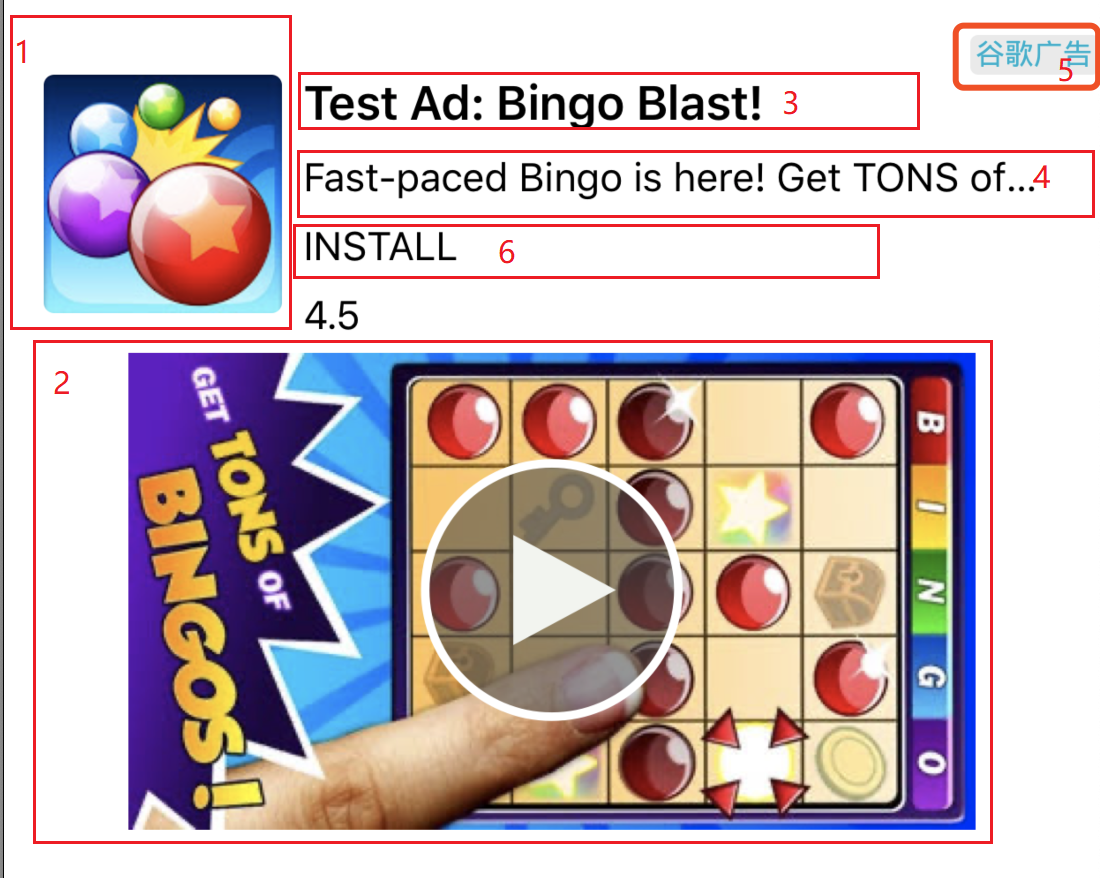
parentProperty controls the overall size of the Native ad, as shown in the red-circled area below.
Native ad element descriptions:
- appIconProperty: The appIconProperty controls the ad's icon property, as shown in Figure 1 below:
- mainImageProperty: mainImageProperty controls the ad's cover image, as shown in Figure 2 below:
- titleProperty: titleProperty controls the ad title, as shown in Figure 3 below:
- descProperty: descProperty controls the ad description text, as shown in Figure 4 below
- adLogoProperty: adLogoProperty controls the ad logo property, as shown in Figure 5 below. Note: Some platforms have a fixed ad logo position internally and do not support developer-specified positioning, such as Admob.
- ctaButtonProperty: ctaButtonProperty controls the click button, as shown in Figure 6 below
- dislikeButtonProperty: (Added in v5.7.21) dislikeButtonProperty controls the close button (can be left unset if you don't want to display the close button)
Note: All of the above Native ad elements must be rendered when returned
If you want to remove the native ad from the screen, use the following code:
public void cleanView()
{
    Debug.Log ("Developer cleanView native....");
   ATNativeAd.Instance.cleanAdView(mPlacementId_native_all,AnyThinkAds.Demo.ATManager.anyThinkNativeAdView);
}
About Template Rendering Ad Description
- Only parentProperty can be used to control template rendering ads. Adjusting other properties (appIcon, title, desc, adLogo, ctaButton, mainImage, etc.) is invalid. Among them, parentProperty and mainImageProperty must be set, and mainImageProperty parameters can be consistent with parentProperty.
- The width and height of parentProperty must be consistent with the width and height passed during loading, otherwise the ad may display incompletely or too large.
- Template ads have their own aspect ratio, which can be viewed in the ad platform dashboard. Try to select templates with the same or similar aspect ratio in the ad platform dashboard, and pass the width and height in the code with that aspect ratio to load and display ads for the best display effect.
- Adaptive height for template rendering ads: Developers can implement adaptive height through the following steps (adaptive height during loading is only for Pangle and GDT platforms on Android). Note:
- When using adaptive height, taller template ads may appear. Developers can check the desired aspect ratio templates in the ad platform dashboard based on actual needs and remove templates that do not meet expectations.
- Adaptive height is not controlled by the height of parentProperty.
-
- (This point is only for Android) Enable adaptive height during loading (Key must be passed: ADAPTIVE_HEIGHT)
Dictionary<string, object> jsonmap = new Dictionary<string, object>();

#if UNITY_ANDROID
    ATSize nativeSize = new ATSize(width, height);
    jsonmap.Add(ATNativeAdLoadingExtra.kATNativeAdLoadingExtraNativeAdSizeStruct, nativeSize);
    jsonmap.Add(AnyThinkAds.Api.ATConst.ADAPTIVE_HEIGHT, AnyThinkAds.Api.ATConst.ADAPTIVE_HEIGHT_YES);
...
ATNativeAd.Instance.loadNativeAd(mPlacementId_native_all, jsonmap);-
- Enable adaptive height during display (Key must be passed: Key: ADAPTIVE_HEIGHT)
...
Dictionary<string, string> jsonmap = new Dictionary<string, string>();
jsonmap.Add(AnyThinkAds.Api.ATConst.ADAPTIVE_HEIGHT, AnyThinkAds.Api.ATConst.ADAPTIVE_HEIGHT_YES);

ATNativeAd.Instance.renderAdToScene(mPlacementId_native_all, anyThinkNativeAdView, jsonmap);-
- During display, the ad can be controlled to be centered at the top or bottom of the screen
...
Dictionary<string, string> jsonmap = new Dictionary<string, string>();
jsonmap.Add(AnyThinkAds.Api.ATConst.POSITION, AnyThinkAds.Api.ATConst.POSITION_BOTTOM);// Centered at bottom of screen
//jsonmap.Add(AnyThinkAds.Api.ATConst.POSITION, AnyThinkAds.Api.ATConst.POSITION_TOP);// Centered at top of screen

ATNativeAd.Instance.renderAdToScene(mPlacementId_native_all, anyThinkNativeAdView, jsonmap);
6. Implement Native Ad Listeners (Note: Only supported on V5.9.51 and above)
For callback info details, see: Callback Info Description
Use the following code to implement multiple listeners:
        // Ad loaded successfully
           ATNativeAd.Instance.client.onAdLoadEvent += onAdLoad;
           // Ad load failed
        ATNativeAd.Instance.client.onAdLoadFailureEvent += onAdLoadFail;
        // Ad displayed successfully
        ATNativeAd.Instance.client.onAdImpressEvent += onAdImpressed;
        // Ad clicked
        ATNativeAd.Instance.client.onAdClickEvent += onAdClick;
        // Ad close button clicked, some ad platforms have this callback
        ATNativeAd.Instance.client.onAdCloseEvent += onAdClose;
        // Ad video playback started, some ad platforms have this callback
        ATNativeAd.Instance.client.onAdVideoStartEvent += onAdVideoStart;
        // Ad video playback ended, some ad platforms have this callback
        ATNativeAd.Instance.client.onAdVideoEndEvent += onAdVideoEnd;
        // Ad video playback progress, some ad platforms have this callback
        ATNativeAd.Instance.client.onAdVideoProgressEvent += onAdVideoProgress;
Advanced listener settings:
        // Ad Source started loading
        ATNativeAd.Instance.client.onAdSourceAttemptEvent += startLoadingADSource;
        // Ad Source loading completed
        ATNativeAd.Instance.client.onAdSourceFilledEvent += finishLoadingADSource;
        // Ad Source failed
        ATNativeAd.Instance.client.onAdSourceLoadFailureEvent += failToLoadADSource;
        // Ad Source started bidding
        ATNativeAd.Instance.client.onAdSourceBiddingAttemptEvent += startBiddingADSource;
        // Ad Source bidding succeeded
        ATNativeAd.Instance.client.onAdSourceBiddingFilledEvent += finishBiddingADSource;
        // Ad Source bidding failed
        ATNativeAd.Instance.client.onAdSourceBiddingFailureEvent += failBiddingADSource;
The method definition parameters are as follows (Note: You can refer to the code below for method names or use custom method names, but the parameters must be consistent):
    //sender is the ad type object, erg is the returned info
   // Ad loaded successfully
    public void onAdLoad(object sender, ATAdEventArgs erg)
    {
        Debug.Log("Developer onAdLoaded------:" + erg.placementId);
    }
    // Ad load failed
    public void onAdLoadFail(object sender, ATAdEventArgs erg)
    {
        Debug.Log("Developer onAdLoadFail------:" + erg.placementId + "--code:" + erg.code + "--msg:" + erg.message);
    }
    // Ad displayed successfully
    public void onAdImpressed(object sender, ATAdEventArgs erg)
    {
        Debug.Log("Developer onAdImpressed------:" + erg.placementId);
    }
    // Ad clicked
    public void onAdClicked(object sender, ATAdEventArgs erg)
    {
        Debug.Log("Developer onAdClicked------:" + erg.placementId);
    }
    // Ad video playback started, some ad platforms have this callback
    public void onAdVideoStart(object sender, ATAdEventArgs erg)
    {
        Debug.Log("Developer onAdVideoStart------:" + erg.placementId);
    }
    // Ad video playback ended, some ad platforms have this callback
    public void onAdVideoEnd(object sender, ATAdEventArgs erg)
    {
        Debug.Log("Developer onAdVideoEnd------:" + erg.placementId);
    }
    // Ad video playback progress, some ad platforms have this callback
    public void onAdVideoProgress(object sender, ATAdProgressEventArgs erg)
    {
        Debug.Log("Developer onAdVideoProgress------:" + erg.placementId);
    }
    // Ad close button clicked, some ad platforms have this callback
    public void onAdCloseButtonClicked(object sender, ATAdEventArgs erg)
    {
        Debug.Log("Developer onAdCloseButtonClicked------:" + erg.placementId);
   }

      // v5.8.10 added Ad Source-level callbacks
      // Ad Source started loading
    public void startLoadingADSource(object sender, ATAdEventArgs erg){
        Debug.Log("Developer startLoadingADSource------");
    }
      // Ad Source loading completed
        public void finishLoadingADSource(string placementId, ATCallbackInfo callbackInfo){
        Debug.Log("Developer finishLoadingADSource------");
    }
      // Ad Source failed
        public void failToLoadADSource(object sender, ATAdEventArgs erg){
        Debug.Log("Developer failToLoadADSource------");
    }
      // Ad Source started bidding
        public void startBiddingADSource(object sender, ATAdEventArgs erg){
               Debug.Log("Developer startBiddingADSource------");
    }
      // Ad Source bidding succeeded
        public void finishBiddingADSource(object sender, ATAdEventArgs erg){
        Debug.Log("Developer finishBiddingADSource------");
    }
      // Ad Source bidding failed
        public void failBiddingADSource(object sender, ATAdEventArgs erg){
        Debug.Log("Developer failBiddingADSource------");
    }
7. Legacy Native Ad Listener Implementation (Note: Only for use below V5.9.51, deprecated in new versions)
To get notified about various native ad events (load success/failure, impression, click, etc.), you can define an implementation class of ATNativeAdListener. Below is an example: (Note: For Android, all callback methods are not on the Unity main thread)
class ATNativeCallbackListener : ATNativeAdListener
{
    // Ad loaded successfully
    public void onAdLoaded(string placementId)
    {
        Debug.Log("Developer onAdLoaded------:" + placementId);
    }
    // Ad load failed
    public void onAdLoadFail(string placementId, string code, string message)
    {
        Debug.Log("Developer onAdLoadFail------:" + placementId + "--code:" + code + "--msg:" + message);
    }
    // Ad displayed successfully
    public void onAdImpressed(string placementId, ATCallbackInfo callbackInfo)
    {
        Debug.Log("Developer onAdImpressed------:" + placementId);
    }
    // Ad clicked
    public void onAdClicked(string placementId, ATCallbackInfo callbackInfo)
    {
        Debug.Log("Developer onAdClicked------:" + placementId);
    }
    // Ad video playback started, some ad platforms have this callback
    public void onAdVideoStart(string placementId)
    {
        Debug.Log("Developer onAdVideoStart------:" + placementId);
    }
    // Ad video playback ended, some ad platforms have this callback
    public void onAdVideoEnd(string placementId)
    {
        Debug.Log("Developer onAdVideoEnd------:" + placementId);
    }
    // Ad video playback progress, some ad platforms have this callback
    public void onAdVideoProgress(string placementId, int progress)
    {
        Debug.Log("Developer onAdVideoProgress------:" + placementId);
    }
    // Ad close button clicked, some ad platforms have this callback
    public void onAdCloseButtonClicked(string placementId, ATCallbackInfo callbackInfo)
    {
        Debug.Log("Developer onAdCloseButtonClicked------:" + placementId);
   }

      // v5.8.10 added Ad Source-level callbacks
      // Ad Source started loading
    public void startLoadingADSource(string placementId, ATCallbackInfo callbackInfo){
        Debug.Log("Developer startLoadingADSource------");
    }
      // Ad Source loading completed
        public void finishLoadingADSource(string placementId, ATCallbackInfo callbackInfo){
        Debug.Log("Developer finishLoadingADSource------");
    }
      // Ad Source failed
        public void failToLoadADSource(string placementId,ATCallbackInfo callbackInfo,string code, string message){
        Debug.Log("Developer failToLoadADSource------");
    }
      // Ad Source started bidding
        public void startBiddingADSource(string placementId, ATCallbackInfo callbackInfo){
               Debug.Log("Developer startBiddingADSource------");
    }
      // Ad Source bidding succeeded
        public void finishBiddingADSource(string placementId, ATCallbackInfo callbackInfo){
        Debug.Log("Developer finishBiddingADSource------");
    }
      // Ad Source bidding failed
        public void failBiddingADSource(string placementId,ATCallbackInfo callbackInfo,string code, string message){
        Debug.Log("Developer failBiddingADSource------");
    }
}
Note: The code snippets you see in this section are from the nativeScene.cs demo project in our Demo.
;}.cls-2{fill:%230868f7;}.cls-3{fill:url(%23未命名的渐变_44);}.cls-4{fill:%23333;}%3c/style%3e%3clinearGradient%20id='未命名的渐变_8'%20x1='33.73'%20y1='100.61'%20x2='-0.03'%20y2='-1.06'%20gradientUnits='userSpaceOnUse'%3e%3cstop%20offset='0'%20stop-color='%237ae9fb'/%3e%3cstop%20offset='0.67'%20stop-color='%232b90f8'/%3e%3cstop%20offset='1'%20stop-color='%230868f7'/%3e%3c/linearGradient%3e%3clinearGradient%20id='未命名的渐变_44'%20x1='27.86'%20y1='18.67'%20x2='68.36'%20y2='22.22'%20gradientUnits='userSpaceOnUse'%3e%3cstop%20offset='0'%20stop-color='%235ac7f2'/%3e%3cstop%20offset='1'%20stop-color='%230868f7'/%3e%3c/linearGradient%3e%3c/defs%3e%3cpath%20class='cls-1'%20d='M29,28.74V81.91l-9.51-3.68v0L8.52,74A7.17,7.17,0,0,1,4,67.32V24.54A3.76,3.76,0,0,1,9.08,21Z'/%3e%3cpath%20class='cls-2'%20d='M68.09,78.07a13.15,13.15,0,0,1-17.9,12.06L29,81.91h0V28.74L50.19,37A13.17,13.17,0,0,0,68.08,25.3h0Z'/%3e%3cpath%20class='cls-3'%20d='M68.08,25.3a13.19,13.19,0,0,1-6.73,10.87A13.09,13.09,0,0,1,50.19,37L29,28.74V6A3.76,3.76,0,0,1,34.1,2.52l25.59,9.91A13.22,13.22,0,0,1,68.08,25.3Z'/%3e%3cpath%20class='cls-4'%20d='M129.06,81.76a4.33,4.33,0,0,1-3.19-1.31,4.4,4.4,0,0,1-1.31-3.24V56.86H97.65V77.21a4.36,4.36,0,0,1-1.35,3.2A4.68,4.68,0,0,1,93,81.76a4.32,4.32,0,0,1-3.19-1.31,4.37,4.37,0,0,1-1.32-3.24V27.27A4.58,4.58,0,0,1,89.83,24a4.59,4.59,0,0,1,7.82,3.27V48.15h26.91V27.27A4.58,4.58,0,0,1,125.91,24a4.59,4.59,0,0,1,7.82,3.27V77.21a4.37,4.37,0,0,1-1.36,3.2A4.65,4.65,0,0,1,129.06,81.76Z'/%3e%3cpath%20class='cls-4'%20d='M163.77,81.66c-6.57,0-11.76-1.92-15.44-5.7s-5.54-9.07-5.54-15.74a26.76,26.76,0,0,1,2.09-10.43,17.72,17.72,0,0,1,6.67-8.06,19.15,19.15,0,0,1,10.68-2.95,19,19,0,0,1,10.46,2.8,18.7,18.7,0,0,1,6.55,7.36,22.53,22.53,0,0,1,2.36,10.28A4.51,4.51,0,0,1,177,63.77H152.23a10.8,10.8,0,0,0,3.49,6.65c2,1.68,4.88,2.52,8.66,2.52a22.25,22.25,0,0,0,7.54-1.21c.74-.3,1.55-.67,2.37-1.07a3.75,3.75,0,0,1,1.84-.4,4.09,4.09,0,0,1,3,1.15,4,4,0,0,1,1.12,3,4.38,4.38,0,0,1-2.58,3.82,32.34,32.34,0,0,1-6.36,2.61A28.67,28.67,0,0,1,163.77,81.66ZM172.4,55.9a9.72,9.72,0,0,0-1.63-4.56A9.9,9.9,0,0,0,167,48a10.38,10.38,0,0,0-4.64-1.14,12,12,0,0,0-4.77,1.06,9.54,9.54,0,0,0-4.89,5.66,11.78,11.78,0,0,0-.51,2.3Z'/%3e%3cpath%20class='cls-4'%20d='M193,81.64a4.49,4.49,0,0,1-4.51-4.55V27.28A4.58,4.58,0,0,1,189.84,24a4.48,4.48,0,0,1,3.28-1.36A4.36,4.36,0,0,1,196.35,24a4.46,4.46,0,0,1,1.31,3.31V77.09a4.34,4.34,0,0,1-1.35,3.2A4.67,4.67,0,0,1,193,81.64Z'/%3e%3cpath%20class='cls-4'%20d='M263.79,81.71a5.7,5.7,0,0,1-4.2-1.74,5.76,5.76,0,0,1-1.73-4.19V27.37a4.58,4.58,0,0,1,1.35-3.27A4.59,4.59,0,0,1,267,27.37V72.53h24a4.58,4.58,0,0,1,3.27,7.82A4.66,4.66,0,0,1,291,81.71Z'/%3e%3cpath%20class='cls-4'%20d='M424.48,81.74a4.71,4.71,0,0,1-2.71-.88,5.43,5.43,0,0,1-1-1l-.07-.09-12.41-17-5.41,5v9.44a4.31,4.31,0,0,1-1.36,3.19,4.66,4.66,0,0,1-3.3,1.36A4.29,4.29,0,0,1,395,80.42a4.36,4.36,0,0,1-1.32-3.23V27.37A4.58,4.58,0,0,1,395,24.1a4.52,4.52,0,0,1,6.58.12,4.54,4.54,0,0,1,1.24,3.15V56.31l17.72-16.38.05,0a4.8,4.8,0,0,1,2.94-1.11,4.4,4.4,0,0,1,3.27,1.2,4.57,4.57,0,0,1,1.2,3.27,4.44,4.44,0,0,1-.77,2.33,7.45,7.45,0,0,1-1.43,1.65l-11,9.64,13.34,17.68a5,5,0,0,1,1,2.71,4.12,4.12,0,0,1-1.36,3.24A4.64,4.64,0,0,1,424.48,81.74Z'/%3e%3cpath%20class='cls-4'%20d='M317.93,81.76a21.5,21.5,0,1,1,21.17-21.5A21.37,21.37,0,0,1,317.93,81.76Zm0-34.1a12.61,12.61,0,1,0,12.42,12.6A12.52,12.52,0,0,0,317.93,47.66Z'/%3e%3cpath%20class='cls-4'%20d='M212.18,101.22a4.12,4.12,0,0,1-3.05-1.26,4.17,4.17,0,0,1-1.26-3.1V43.34a4.37,4.37,0,0,1,1.3-3.14,4.26,4.26,0,0,1,3.13-1.3,4.19,4.19,0,0,1,3.1,1.26,4.32,4.32,0,0,1,1.26,3.16,20.77,20.77,0,0,1,13-4.54,21.51,21.51,0,0,1,0,43,20.51,20.51,0,0,1-13-4.57V96.86a4.15,4.15,0,0,1-1.3,3.06A4.5,4.5,0,0,1,212.18,101.22Zm17.43-53.63c-6.23,0-12.93,4.11-12.93,12.72a12.73,12.73,0,0,0,25.46,0A12.71,12.71,0,0,0,229.61,47.59Z'/%3e%3cpath%20class='cls-4'%20d='M365.76,81.76a21.5,21.5,0,1,1,21.18-21.5A21.37,21.37,0,0,1,365.76,81.76Zm0-34.1a12.61,12.61,0,1,0,12.42,12.6A12.52,12.52,0,0,0,365.76,47.66Z'/%3e%3c/svg%3e)