
self-rendering ads
1. Introduction
Self-Rendering ad integration. Must-read Native Ad Platform Notes.
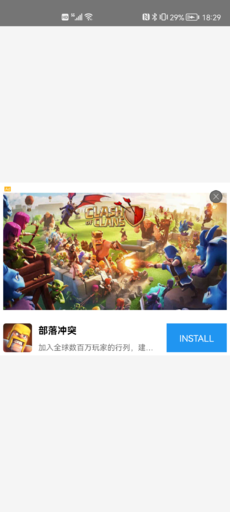
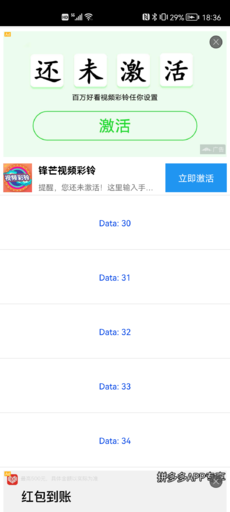
Self-rendering ads are a relatively advanced usage in native ads. Developers can obtain all creative materials of the ad for custom layout ad rendering. It is generally implemented nested within the product's own layout. As shown in the screenshots below:
| Fixed Position Display | Info Feed List Display |
|---|---|
 |
 |
2. Integration Suggestions
Note: The SDK will not hold references to the ad instance (ATNative) and callback instance (ATNativeNetworkListener), so developers need to ensure that the ad instance is not reclaimed before the ad ends to avoid callback loss.
(1) When the app starts, use ATNative.makeAdRequest to execute ad loading. Request ads in advance so that ads can be quickly displayed when needed.
(2) It is recommended to call entryAdScenario(placementId,scenarioId) after entering a displayable ad scenario to count the cache status of the current Ad Placement. For detailed usage of statistics, see Ad Scenarios for distinguishing data across different business scenarios.
(3) Do not execute the ad loading method in the onNativeAdLoadFail callback, otherwise it will cause many unnecessary requests and may cause the app to lag.
(4) Get the ad object via ATNative.getNativeAd at the position where native ads need to be displayed to check whether it is null:
- If null: Re-execute
ATNative.makeAdRequestto load ads. - If not null: Display the
NativeAdad object. At this point, you can directly callATNative.makeAdRequestagain to preload the next ad (as long as you have calledATNative.getNativeAd, you can directly preload the next ad).
(5) It is recommended to configure a preset strategy to improve the ad loading efficiency during the first cold start. For specific instructions and integration tutorials, see SDK Preset Strategy Instructions.
3. API Instructions
3.1 Loading Ads
ATNative: Native ad loading class.
| API | Description |
|---|---|
| ATNative(Context context, String nativeTakuPlacementID, ATNativeNetworkListener listener) | Native ad initialization method. nativeTakuPlacementID is obtained by creating a Native Ad Placement in the Taku dashboard. |
| onNativeAdLoaded | Ad load success. |
| onNativeAdLoadFail(AdError error) | Ad load failure. You can get the full error info via AdError.getFullErrorInfo(). Please refer to AdError. Note: Do not execute the ad loading method in this callback for retry, otherwise it will cause many unnecessary requests and may cause the app to lag. |
| makeAdRequest | Initiate a Native ad request. |
Notes
Huawei: When displaying Huawei Native ads, a Huawei close button may be included by default. If the developer calls ATNativePrepareInfo#setCloseView() to set a close button, two close buttons may appear during Huawei Native ad display.
Solution: Before loading native ads, pass HuaweiATConst.CUSTOM_DISLIKE as true and ATAdConst.KEY.AD_CHOICES_PLACEMENT as ATAdConst.AD_CHOICES_PLACEMENT_INVISIBLE via setLocalExtra to hide the Huawei close button display.
ATNative atNative;
NativeAd mNativeAd;

int adViewWidth;
int adViewHeight;

public void loadNativeAd() {
  if (atNative == null) {
     // Initialize the ad loading object
     atNative = new ATNative(this, nativeTakuPlacementID, new ATNativeNetworkListener() {
                @Override
                public void onNativeAdLoaded() {
                    Log.i(TAG, "onNativeAdLoaded");
                }

                @Override
                public void onNativeAdLoadFail(AdError adError) {
                    // Note: Do not execute the ad loading method in this callback for retry, otherwise it will cause many unnecessary requests and may cause the app to lag.
                    // AdError, please refer to https://newdocs.takuad.com/docs/55cxNt
                    Log.i(TAG, "onNativeAdLoadFail:" + adError.getFullErrorInfo());
                }
            });
   }

  // To resolve Huawei Native ads displaying two close buttons simultaneously, add this code before loading to hide the Huawei close button.
  // Map localMap = new HashMap<>();
  // localMap.put(HuaweiATConst.CUSTOM_DISLIKE, true);
  // localMap.put(ATAdConst.KEY.AD_CHOICES_PLACEMENT, ATAdConst.AD_CHOICES_PLACEMENT_INVISIBLE);
  // atNative.setLocalExtra(localMap)

    // Initiate ad request
    atNative.makeAdRequest();
}
3.2 Displaying Ads
NativeAd: The ad object obtained via ATNative.getNativeAd().
Note: It is recommended to understand Native Ad Platform Notes to avoid display and click issues.
| Method | Description |
|---|---|
| isNativeExpress | Whether it is a template rendering type of ad. |
| renderAdContainer(ATNativeAdView view, View selfRenderView) | Used for ad rendering. The view must use our provided ATNativeAdView. Note: When isNativeExpress() returns false (i.e., self-rendering), selfRenderView must pass the developer's custom View. When it returns true (template rendering), null can be passed. |
| prepare(ATNativeAdView view, ATNativePrepareInfo nativePrepareInfo) | Used to configure ad click events, bind close buttons for self-rendering, control the display position and size of the ad identifier, etc. Called after the renderAdContainer method (by default, all views are clickable, and ad identifiers have default display positions and sizes). |
ATNativeAdView mATNativeAdView; // Container that must be created for rendering ads.
View mSelfRenderView; // Developer custom layout container.

public void showNativeAd(ViewGroup adContainer, int adViewWidth) {
    /*
     To count scenario arrival rate, related info can be found at "https://help.takuad.com/docs/1RWLAv"
     Call the “enter ad scenario” method when the ad triggering conditions are met, for example:
     ** If the ad scenario is to display an ad after a cleanup is finished, call it when the cleanup is finished;
     * 1. First call "entryAdScenario"
     * 2. Then call "ATNative#checkAdStatus#isReady" to check if it is displayable
     * 3. Finally call "getNativeAd" to display
     * 4. Passing the scenario ID into scenario will only result in data reaching the dashboard funnel report (optional).
     */

    if (atNative == null) {
        return;
    }

    if (!atNative.checkAdStatus().isReady()) {
        return;
    }

    if (mATNativeAdView == null) {
        mATNativeAdView = findViewById(R.id.native_ad_view); // Can be defined in xml layout.
    }

    if (mSelfRenderView == null) {
        mSelfRenderView = mATNativeAdView.findViewById(R.id.native_selfrender_view); // Can be defined in xml layout.
    }
    ATNative.entryAdScenario("your Native placementID", "your scenarioID");
   // v6.5.80 and above
    atNative.entryAdScenario("your scenarioID");
    NativeAd nativeAd = atNative.getNativeAd();
    // After calling getNativeAd, developers can directly use ATNative#makeAdRequest to initiate preloading of the next ad.
    // loadNativeAd();

    if (nativeAd != null) {
        // Destroy the previously displayed ad object.
        if (mNativeAd != null) {
            mNativeAd.destory();
        }

        mNativeAd = nativeAd;
        mNativeAd.setNativeEventListener(new ATNativeEventListener() {
            @Override
            public void onAdImpressed(ATNativeAdView view, ATAdInfo atAdInfo) {
                // ATAdInfo can distinguish ad platforms and obtain the ad placement ID of the ad platform, etc.
                // Please refer to https://newdocs.takuad.com/docs/JSLSJN
                Log.i(TAG, "native ad onAdImpressed:\n" + atAdInfo.toString());
            }

            @Override
            public void onAdClicked(ATNativeAdView view, ATAdInfo atAdInfo) {
                Log.i(TAG, "native ad onAdClicked:\n" + atAdInfo.toString());
            }

            @Override
            public void onAdVideoStart(ATNativeAdView view) {
                Log.i(TAG, "native ad onAdVideoStart");
            }

            @Override
            public void onAdVideoEnd(ATNativeAdView view) {
                Log.i(TAG, "native ad onAdVideoEnd");
            }

            @Override
            public void onAdVideoProgress(ATNativeAdView view, int progress) {
                Log.i(TAG, "native ad onAdVideoProgress:" + progress);
            }
        });

        ATNativePrepareInfo nativePrepareInfo;

        if (!mNativeAd.isNativeExpress()) {
            // Self-Rendering
            nativePrepareInfo = new ATNativePrepareInfo();

            bindSelfRenderView(this, mNativeAd.getAdMaterial(), mSelfRenderView,
                    nativePrepareInfo);

            mNativeAd.renderAdContainer(mATNativeAdView, mSelfRenderView);
        } else {
            // Template Rendering
            mNativeAd.renderAdContainer(mATNativeAdView, null);
        }

        mNativeAd.prepare(mATNativeAdView, nativePrepareInfo);
    }
}public static void bindSelfRenderView(Context context, ATNativeMaterial adMaterial,
View selfRenderView,
ATNativePrepareInfo nativePrepareInfo) {
int padding = dip2px(context, 5);
selfRenderView.setPadding(padding, padding, padding, padding);
TextView titleView = (TextView) selfRenderView.findViewById(R.id.native_ad_title);
TextView descView = (TextView) selfRenderView.findViewById(R.id.native_ad_desc);
TextView ctaView = (TextView) selfRenderView.findViewById(R.id.native_ad_install_btn);
TextView adFromView = (TextView) selfRenderView.findViewById(R.id.native_ad_from);
FrameLayout iconArea = (FrameLayout) selfRenderView.findViewById(R.id.native_ad_image);
FrameLayout contentArea = (FrameLayout) selfRenderView.findViewById(R.id.native_ad_content_image_area);
final ATNativeImageView logoView = (ATNativeImageView) selfRenderView.findViewById(R.id.native_ad_logo);
View closeView = selfRenderView.findViewById(R.id.native_ad_close);
FrameLayout shakeViewContainer = (FrameLayout) selfRenderView.findViewById(R.id.native_ad_shake_view_container);
FrameLayout slideViewContainer = (FrameLayout) selfRenderView.findViewById(R.id.native_ad_slide_view_container);
FrameLayout adLogoContainer = selfRenderView.findViewById(R.id.native_ad_logo_container);
// bind view
if (nativePrepareInfo == null) {
nativePrepareInfo = new ATNativePrepareInfo();
}
//click views
List clickViewList = new ArrayList<>();
String title = adMaterial.getTitle();
// title
if (!TextUtils.isEmpty(title)) {
titleView.setText(title);
nativePrepareInfo.setTitleView(titleView);//bind title
clickViewList.add(titleView);
titleView.setVisibility(View.VISIBLE);
} else {
titleView.setVisibility(View.GONE);
}
// desc
String descriptionText = adMaterial.getDescriptionText();
if (!TextUtils.isEmpty(descriptionText)) {
descView.setText(descriptionText);
nativePrepareInfo.setDescView(descView);//bind desc
clickViewList.add(descView);
descView.setVisibility(View.VISIBLE);
} else {
descView.setVisibility(View.GONE);
}
// icon
View adIconView = adMaterial.getAdIconView();
String iconImageUrl = adMaterial.getIconImageUrl();
iconArea.removeAllViews();
final ATNativeImageView iconView = new ATNativeImageView(context);
if (adIconView != null) {
iconArea.addView(adIconView);
nativePrepareInfo.setIconView(adIconView);//bind icon
clickViewList.add(adIconView);
iconArea.setVisibility(View.VISIBLE);
} else if (!TextUtils.isEmpty(iconImageUrl)) {
iconArea.addView(iconView);
iconView.setImage(iconImageUrl);
nativePrepareInfo.setIconView(iconView);//bind icon
clickViewList.add(iconView);
iconArea.setVisibility(View.VISIBLE);
} else {
iconArea.setVisibility(View.INVISIBLE);
}
// cta button
String callToActionText = adMaterial.getCallToActionText();
if (!TextUtils.isEmpty(callToActionText)) {
ctaView.setText(callToActionText);
nativePrepareInfo.setCtaView(ctaView);//bind cta button
clickViewList.add(ctaView);
ctaView.setVisibility(View.VISIBLE);
} else {
ctaView.setVisibility(View.GONE);
}
// media view
View mediaView = adMaterial.getAdMediaView(contentArea);
List imageList = adMaterial.getImageUrlList();
//some network support return main image width、height,if not support return -1
int mainImageHeight = adMaterial.getMainImageHeight();
int mainImageWidth = adMaterial.getMainImageWidth();
int realMainImageWidth = context.getResources().getDisplayMetrics().widthPixels - dip2px(
context, 10);
int realMainHeight = 0;
//media view or mainImage layout params
FrameLayout.LayoutParams mainImageParam = new FrameLayout.LayoutParams(
FrameLayout.LayoutParams.MATCH_PARENT
, FrameLayout.LayoutParams.WRAP_CONTENT);
if (mainImageWidth > 0 && mainImageHeight > 0 && mainImageWidth > mainImageHeight) {
realMainHeight = realMainImageWidth * mainImageHeight / mainImageWidth;
mainImageParam.width = realMainImageWidth;
mainImageParam.height = realMainHeight;
} else {
mainImageParam.width = FrameLayout.LayoutParams.MATCH_PARENT;
//contentArea radio
mainImageParam.height = realMainImageWidth * 600 / 1024;
}
contentArea.removeAllViews();
if (mediaView != null) {
if (mediaView.getParent() != null) {
((ViewGroup) mediaView.getParent()).removeView(mediaView);
}
mainImageParam.gravity = Gravity.CENTER;
mediaView.setLayoutParams(mainImageParam);
contentArea.addView(mediaView, mainImageParam);
contentArea.setVisibility(View.VISIBLE);
} else if (imageList != null && imageList.size() > 1) {
MutiImageView mutiImageView = new MutiImageView(context);
mutiImageView.setImageList(imageList, mainImageWidth, mainImageHeight);
nativePrepareInfo.setMainImageView(mutiImageView);//bind main image
contentArea.addView(mutiImageView,
new FrameLayout.LayoutParams(ViewGroup.LayoutParams.MATCH_PARENT,
ViewGroup.LayoutParams.WRAP_CONTENT));
clickViewList.add(mutiImageView);
contentArea.setVisibility(View.VISIBLE);
} else if (!TextUtils.isEmpty(adMaterial.getMainImageUrl())) {
ATNativeImageView imageView = new ATNativeImageView(context);
imageView.setImage(adMaterial.getMainImageUrl());
imageView.setLayoutParams(mainImageParam);
contentArea.addView(imageView, mainImageParam);
nativePrepareInfo.setMainImageView(imageView);//bind main image
clickViewList.add(imageView);
contentArea.setVisibility(View.VISIBLE);
} else {
contentArea.removeAllViews();
contentArea.setVisibility(View.GONE);
}
//Ad Logo
View adLogoView = adMaterial.getAdLogoView();
if (adLogoView != null) {
adLogoContainer.setVisibility(View.VISIBLE);
adLogoContainer.removeAllViews();
adLogoContainer.addView(adLogoView);
} else {
adLogoContainer.setVisibility(View.GONE);
String adChoiceIconUrl = adMaterial.getAdChoiceIconUrl();
Bitmap adLogoBitmap = adMaterial.getAdLogo();
if (!TextUtils.isEmpty(adChoiceIconUrl)) {
logoView.setImage(adChoiceIconUrl);
logoView.setVisibility(View.VISIBLE);
nativePrepareInfo.setAdLogoView(logoView);//bind ad choice
} else if (adLogoBitmap != null) {
logoView.setImageBitmap(adLogoBitmap);
logoView.setVisibility(View.VISIBLE);
nativePrepareInfo.setAdLogoView(logoView);//bind ad choice
} else {
logoView.setImageBitmap(null);
logoView.setVisibility(View.GONE);
}
}
//bind layout params for ad choice
FrameLayout.LayoutParams layoutParams = new FrameLayout.LayoutParams(dip2px(context, 40),
dip2px(context, 10));//ad choice
layoutParams.gravity = Gravity.BOTTOM | Gravity.RIGHT;
nativePrepareInfo.setChoiceViewLayoutParams(layoutParams);
// ad from
String adFrom = adMaterial.getAdFrom();
if (!TextUtils.isEmpty(adFrom)) {
adFromView.setText(adFrom);
adFromView.setVisibility(View.VISIBLE);
} else {
adFromView.setVisibility(View.GONE);
}
nativePrepareInfo.setAdFromView(adFromView);//bind ad from
nativePrepareInfo.setCloseView(closeView);//bind close button
nativePrepareInfo.setClickViewList(clickViewList);//bind click view list
//set direct download views
//if (nativePrepareInfo instanceof ATNativePrepareExInfo) {
// List creativeClickViewList = new ArrayList<>();//click views
// creativeClickViewList.add(ctaView);
// ((ATNativePrepareExInfo) nativePrepareInfo).setCreativeClickViewList(creativeClickViewList);//bind custom view list
//}
}
public static int dip2px(Context context, float dipValue) {
float scale = context.getResources().getDisplayMetrics().density;
return (int) (dipValue * scale + 0.5f);
}3.3 Close Button Instructions (Optional)
(1) Developers can call the ATNativePrepareInfo#setCloseView() method to set the close button into ATNativePrepareInfo for close button binding. (Must be called before calling the prepare method.)
public void showNativeAd() {
    ...
    int height = adViewWidth * 600 / 1024;
    height = height <= 0 ? FrameLayout.LayoutParams.WRAP_CONTENT : height;

    ATNativePrepareInfo nativePrepareInfo = new ATNativePrepareInfo();

    View selfRenderView = LayoutInflater.from(this).inflate(R.layout.native_ad_item, null);
    bindSelfRenderView(this, mNativeAd.getAdMaterial(), selfRenderView, nativePrepareInfo, height)

    // Render the ad
    mNativeAd.renderAdContainer(anyThinkNativeAdView, selfRenderView);
    mNativeAd.prepare(anyThinkNativeAdView, nativePrepareInfo);
}public void bindSelfRenderView(Context context, ATNativeMaterial adMaterial, View selfRenderView, ATNativePrepareInfo nativePrepareInfo, int height) {
...
View closeView = selfRenderView.findViewById(R.id.native_ad_close);// Developer's own close button.
...
nativePrepareInfo.setCloseView(closeView);//bind close button
}(2) After correctly binding the close button, set the close button listener.
 mNativeAd.setDislikeCallbackListener(new ATNativeDislikeListener() {
                @Override
                public void onAdCloseButtonClick(ATNativeAdView view, ATAdInfo entity) {
                    Log.i(TAG, "native ad onAdCloseButtonClick");
                      // Here, the developer can implement the removal of the ad View.
                }
});
3.4 Destroying Ads
public void destroyAd() {
    if (mNativeAd != null) {
        mNativeAd.destory();
    }
}
4. Sample Code
ATNative atNative;
NativeAd mNativeAd;

int adViewWidth;
int adViewHeight;

public void loadNativeAd() {
  if (atNative == null) {
     // Initialize the ad loading object
      atNative = new ATNative(this, nativeTakuPlacementID, new ATNativeNetworkListener() {
                @Override
                public void onNativeAdLoaded() {
                    Log.i(TAG, "onNativeAdLoaded");
                }

                @Override
                public void onNativeAdLoadFail(AdError adError) {
                    // Note: Do not execute the ad loading method in this callback for retry, otherwise it will cause many unnecessary requests and may cause the app to lag.
                    // AdError, please refer to https://docs.takuad.com/#/zh-cn/android/android_doc/android_test?id=aderror
                    Log.i(TAG, "onNativeAdLoadFail:" + adError.getFullErrorInfo());
                }
            });
   }
   // Initiate ad request
   atNative.makeAdRequest();
}
For detailed self-rendering ad sample code, please refer to the NativeAdActivity class in Demo, and for bindSelfRenderView, please refer to the SelfRenderViewUtil class.
5. Ad Creative Instructions
NativeAd: The ad object obtained via ATNative.getNativeAd().
| Method | Description |
|---|---|
| getAdMaterial | Returns the ad creative object ATNativeMaterial. •ATNativeMaterial: Ad creative object (the creatives below may all be null, because some ad platforms may not necessarily have all creative information.) |
| Method | Description | Ad Platform Native Ad Guidelines |
|---|---|---|
| getIconImageUrl | Get the URL of the ad icon. | When getAdIconView and getIconImageUrl are both returned, prioritize getAdIconView. Only render one of them. |
| getAdIconView | Get the ad IconView. | When getAdIconView and getIconImageUrl are both returned, prioritize getAdIconView. Only render one of them. |
| getAdMediaView | Get the rendering container for the ad's main image (only available on some ad platforms). It may be a static image or video. Parameter description: view: ad parent container, width: MediaView width configuration. | When getAdMediaView and getMainImageUrl are both returned, prioritize getAdMediaView. Only render one of them. |
| getMainImageUrl | Get the main image URL. | When getAdMediaView and getMainImageUrl are both returned, prioritize getAdMediaView. Only render one of them. |
| getTitle | Get the ad title. | Must render when returned. |
| getDescriptionText | Get the ad description. | Must render when returned. |
| getCallToActionText | Get the ad CTA button text. | Must render when returned. |
| getAdFrom | Get the ad source. | The Nend ad platform must render this information. |
| getAdChoiceIconUrl | Get the URL of the ad identifier icon. | Choose one among getAdLogo, getAdLogoView to render. It may not necessarily exist. |
| getAdLogo | Get the Bitmap of the AdLogo. | Choose one among getAdChoiceIconUrl, getAdLogoView to render. It may not necessarily exist. |
| getAdLogoView | Get the View of the AdLogo. | Choose one among getAdChoiceIconUrl, getAdLogo to render. It may not necessarily exist. |
| getImageUrlList | Get the image URL list. | - |
| getStarRating | Get the ad rating. | - |
| getAdType | Get the ad type (video, image): CustomNativeAd.NativeAdConst.VIDEO_TYPE: Video type. CustomNativeAd.NativeAdConst.IMAGE_TYPE: Image type. CustomNativeAd.NativeAdConst.UNKNOWN_TYPE: Unknown ad type (unsupported platforms or unobtainable ones are all unknown ad types). | - |
| getNativeAdInteractionType | Get the ad interaction type: NativeAdInteractionType.APP_DOWNLOAD_TYPE: Download-type ad; NativeAdInteractionType.H5_TYPE: Web page ad; NativeAdInteractionType.DEEPLINK_TYPE: App redirect ad; NativeAdInteractionType.UNKNOW: Unknown ad type. | - |
| getNativeType | Get the ad type. CustomNativeAd.NativeType.FEED: Info Feed Ad (Native Ad). CustomNativeAd.NativeType.PATCH: Patch Ad. | - |
| getVideoDuration | Get the total video duration (double type, unit: seconds). | - |
| getAdAppInfo | Get the downloaded apk info object. For specific supported platforms, refer to the ATAdAppInfo description below. | - |
| getMainImageWidth | Get the main image width. Unsupported platforms return -1 (v5.9.96 and above supports return). | - |
| getMainImageHeight | Get the main image height. Unsupported platforms return -1 (v5.9.96 and above supports return). | - |
| getVideoWidth | Get the video width. Unsupported platforms return -1 (v5.9.96 and above supports return). | - |
| getVideoHeight | Get the video height. Unsupported platforms return -1 (v5.9.96 and above supports return). | - |
| getAdvertiserName | Get the advertiser name. | - |
| getShakeView(int width, int height, ATShakeViewListener listener) | Get the Shake component. Returns null if the ad does not support the Shake capability. width: Component width, not less than 80dp. height: Component height, not less than 80dp. listener: Component callback (v6.1.40 and above supported, currently only Baidu supports it.) | For specific call sample code, refer to Self-Rendering Shake. |
| getSlideView(int width, int height, int repeat, final ATShakeViewListener listener) | Get the Slide component. The slide area is controlled by the container size. Returns null if the ad does not support Slide. width: Width of the slide guide area. height: Height of the slide guide area. repeat: Repeat count of the animation. The component auto-hides after completion. listener: Component callback (v6.2.60 and above supported, currently only Baidu supports it.) | For specific call sample code, refer to the renderSlideView() method in Demo SelfRenderViewUtil class. |
| getDomain | Returns the advertiser's domain. | Only supported by Yandex. |
| getWarning | Returns the warning text. | Only supported by Yandex. |
| getDownloadProgress | Returns the Apk file download progress. | Only supported by GDT and Baidu. |
| getDownloadStatus | Returns the Apk file download status. For specific statuses, refer to ApkDownloadStatus. | Only supported by Adx, GDT, and Baidu. |
ATNativeImageView: Provided by the SDK for displaying network images (optional; developers are recommended to use their own image loading framework.)
| Method | Description |
|---|---|
| setImage(String imageUrl) | Display a network image. imageUrl: Network image URL. |
| setImage(String imageUrl, int width, int height) | Display a network image. imageUrl: Network image URL. width: Image width. height: Image height. |
6. Binding
ATNativePrepareInfo: Binding relationship encapsulation class.
| Method | Description |
|---|---|
| setParentView(View parentView) | Bind parent View. |
| setTitleView(View titleView) | Bind title View. Recommended to bind. |
| setIconView(View iconView) | Bind app icon View. Recommended to bind. |
| setMainImageView(View mainImageView) | Bind main image View. Recommended to bind. |
| setDescView(View descView) | Bind description View. Recommended to bind. |
| setCtaView(View ctaView) | Bind CTA button View. Recommended to bind. |
| setChoiceViewLayoutParams(FrameLayout.LayoutParams choiceViewLayoutParams) | Set the size and position of the ad identifier. |
| setClickViewList(List | Bind the View collection that can trigger clicks. |
| setCloseView(View closeView) | Bind close button. |
| setAdFromView(View adFromView) | Bind ad source View. Recommended to bind. |
| setAdLogoView(View adLogoView) | Bind AdLogo View. |
| setDomainView(View domainView) | Bind domainView. (Yandex must bind.) |
| setWarningView(View warningView) | Bind warningView. (Yandex must bind.) |
ATNativePrepareExInfo: Inherits from ATNativePrepareInfo. Methods are the same as ATNativePrepareInfo. Additional method descriptions are as follows:
| Method | Description |
|---|---|
| setCreativeClickViewList(List <View> creativeClickViewList) | Bind the click View collection for direct download ads. |
| setPermissionClickViewList(List <View> premissionClickViewList) | Bind the click View collection for viewing permissions. |
| setPrivacyClickViewList(List <View> privacyClickViewList) | Bind the click View collection for viewing privacy agreements. |
| setAppInfoClickViewList(List <View> appInfoClickViewList) | Bind the click View collection for viewing product info. |
7. China-Region Download-Type Ad Six Elements
For China-region platform native self-rendering download-type ads, the six elements are returned.
7.1 Integration Suggestions
Developers determine whether NativeAd.getAdMaterial().getAdAppInfo() [Six-element info object for download-type ads] is null. If not null, render the six elements onto the layout.
Note: Not all platforms provide complete six elements, so when rendering, you need to check whether each element return is empty; render only when not empty.
7.2 Sample Code
View sixInfoView = selfRenderView.findViewById(R.id.six_info);
ATAdAppInfo adAppInfo = adMaterial.getAdAppInfo();
if (adAppInfo != null) {
    sixInfoView.setVisibility(View.VISIBLE);
    TextView functionTextView = sixInfoView.findViewById(R.id.function_test);
    TextView developerTextView = sixInfoView.findViewById(R.id.developer_test);
    TextView appnameTextView = sixInfoView.findViewById(R.id.appname_test);
    TextView versionTextView = sixInfoView.findViewById(R.id.version_test);
    TextView privacyTextView = sixInfoView.findViewById(R.id.privacy_test);
    TextView permissionTextView = sixInfoView.findViewById(R.id.permission_test);
    List appInfoClickViewList = new ArrayList<>();
    List privacyClickViewList = new ArrayList<>();
    List permissionClickViewList = new ArrayList<>();
    // Get the app name. Use TitleView to display AppName.
    appnameTextView.setText(TextUtils.isEmpty(adAppInfo.getAppName()) ? "" : adAppInfo.getAppName());
    // Get the developer company name.
    developerTextView.setText(
            TextUtils.isEmpty(adAppInfo.getPublisher()) ? "" : adAppInfo.getPublisher());
    // Get the app version number.
    versionTextView.setText(
            TextUtils.isEmpty(adAppInfo.getAppVersion()) ? "" : adAppInfo.getAppVersion());
    appInfoClickViewList.add(developerTextView);
    appInfoClickViewList.add(versionTextView);
    // Get the product feature URL.
    appInfoClickViewList.add(functionTextView);
    if (!TextUtils.isEmpty(adAppInfo.getFunctionUrl())) {
        functionTextView.setVisibility(View.VISIBLE);
        setOpenUrlClickListener(functionTextView, adAppInfo.getFunctionUrl());
    } else {
        functionTextView.setOnClickListener(null);
        functionTextView.setVisibility(View.GONE);
    }
    // Get the privacy agreement URL.
    privacyClickViewList.add(privacyTextView);
    if (!TextUtils.isEmpty(adAppInfo.getAppPrivacyUrl())) {
        privacyTextView.setVisibility(View.VISIBLE);
        setOpenUrlClickListener(privacyTextView, adAppInfo.getAppPrivacyUrl());
    } else {
        privacyTextView.setVisibility(View.GONE);
        privacyTextView.setOnClickListener(null);
    }
    // Get the permission list URL.
    permissionClickViewList.add(permissionTextView);
    if (!TextUtils.isEmpty(adAppInfo.getAppPermissonUrl())) {
        permissionTextView.setVisibility(View.VISIBLE);
        setOpenUrlClickListener(permissionTextView, adAppInfo.getAppPermissonUrl());
    } else {
        permissionTextView.setVisibility(View.GONE);
        permissionTextView.setOnClickListener(null);
    }
    // Bind view permission, privacy, and product feature click View collections.
    if (nativePrepareInfo instanceof ATNativePrepareExInfo) {
        ((ATNativePrepareExInfo) nativePrepareInfo).setAppInfoClickViewList(
                appInfoClickViewList);
        ((ATNativePrepareExInfo) nativePrepareInfo).setPermissionClickViewList(
                permissionClickViewList);
        ((ATNativePrepareExInfo) nativePrepareInfo).setPrivacyClickViewList(
                privacyClickViewList);
    }
} else {
    sixInfoView.setVisibility(View.GONE);
}
7.3 ATAdAppInfo Six-Element Info Object API Description for Download-Type Ads
| Method | Description | Supported Networks |
|---|---|---|
| getAppName | Get the app name. | GDT, Baidu, Kuaishou, Pangle (China), Mintegral, Mimo, TapTap, Sigmob, VIVO, OPPO, Huawei |
| getPublisher | Get the developer company name. | GDT, Baidu, Kuaishou, Pangle (China), Mintegral, YouKeYing, Mimo, TapTap, Sigmob, VIVO, OPPO, Huawei |
| getAppVersion | Get the app version number. | GDT, Baidu, Kuaishou, Pangle (China), Mintegral, YouKeYing, Mimo, TapTap, Sigmob, VIVO, OPPO, Huawei |
| getAppPrivacyUrl | Get the privacy agreement URL. | GDT, Baidu, Kuaishou, Pangle (China), Mintegral, YouKeYing, Mimo, Sigmob, TapTap, VIVO |
| getAppPermissonUrl | Get the permission list URL. | GDT, Baidu, Kuaishou, Pangle (China), Mimo, Sigmob, TapTap, VIVO |
| getFunctionUrl | Get the product feature URL. // Added in v6.2.37 | GDT, Baidu, Pangle (China), Sigmob, TapTap, VIVO, Kuaishou |
If getAppPrivacyUrl, getAppPermissonUrl, and getFunctionUrl are empty, you can refer to the above sample code for ATNativePrepareExInfo to bind view permission, privacy, and product feature click View collections.
;}.cls-2{fill:%230868f7;}.cls-3{fill:url(%23未命名的渐变_44);}.cls-4{fill:%23333;}%3c/style%3e%3clinearGradient%20id='未命名的渐变_8'%20x1='33.73'%20y1='100.61'%20x2='-0.03'%20y2='-1.06'%20gradientUnits='userSpaceOnUse'%3e%3cstop%20offset='0'%20stop-color='%237ae9fb'/%3e%3cstop%20offset='0.67'%20stop-color='%232b90f8'/%3e%3cstop%20offset='1'%20stop-color='%230868f7'/%3e%3c/linearGradient%3e%3clinearGradient%20id='未命名的渐变_44'%20x1='27.86'%20y1='18.67'%20x2='68.36'%20y2='22.22'%20gradientUnits='userSpaceOnUse'%3e%3cstop%20offset='0'%20stop-color='%235ac7f2'/%3e%3cstop%20offset='1'%20stop-color='%230868f7'/%3e%3c/linearGradient%3e%3c/defs%3e%3cpath%20class='cls-1'%20d='M29,28.74V81.91l-9.51-3.68v0L8.52,74A7.17,7.17,0,0,1,4,67.32V24.54A3.76,3.76,0,0,1,9.08,21Z'/%3e%3cpath%20class='cls-2'%20d='M68.09,78.07a13.15,13.15,0,0,1-17.9,12.06L29,81.91h0V28.74L50.19,37A13.17,13.17,0,0,0,68.08,25.3h0Z'/%3e%3cpath%20class='cls-3'%20d='M68.08,25.3a13.19,13.19,0,0,1-6.73,10.87A13.09,13.09,0,0,1,50.19,37L29,28.74V6A3.76,3.76,0,0,1,34.1,2.52l25.59,9.91A13.22,13.22,0,0,1,68.08,25.3Z'/%3e%3cpath%20class='cls-4'%20d='M129.06,81.76a4.33,4.33,0,0,1-3.19-1.31,4.4,4.4,0,0,1-1.31-3.24V56.86H97.65V77.21a4.36,4.36,0,0,1-1.35,3.2A4.68,4.68,0,0,1,93,81.76a4.32,4.32,0,0,1-3.19-1.31,4.37,4.37,0,0,1-1.32-3.24V27.27A4.58,4.58,0,0,1,89.83,24a4.59,4.59,0,0,1,7.82,3.27V48.15h26.91V27.27A4.58,4.58,0,0,1,125.91,24a4.59,4.59,0,0,1,7.82,3.27V77.21a4.37,4.37,0,0,1-1.36,3.2A4.65,4.65,0,0,1,129.06,81.76Z'/%3e%3cpath%20class='cls-4'%20d='M163.77,81.66c-6.57,0-11.76-1.92-15.44-5.7s-5.54-9.07-5.54-15.74a26.76,26.76,0,0,1,2.09-10.43,17.72,17.72,0,0,1,6.67-8.06,19.15,19.15,0,0,1,10.68-2.95,19,19,0,0,1,10.46,2.8,18.7,18.7,0,0,1,6.55,7.36,22.53,22.53,0,0,1,2.36,10.28A4.51,4.51,0,0,1,177,63.77H152.23a10.8,10.8,0,0,0,3.49,6.65c2,1.68,4.88,2.52,8.66,2.52a22.25,22.25,0,0,0,7.54-1.21c.74-.3,1.55-.67,2.37-1.07a3.75,3.75,0,0,1,1.84-.4,4.09,4.09,0,0,1,3,1.15,4,4,0,0,1,1.12,3,4.38,4.38,0,0,1-2.58,3.82,32.34,32.34,0,0,1-6.36,2.61A28.67,28.67,0,0,1,163.77,81.66ZM172.4,55.9a9.72,9.72,0,0,0-1.63-4.56A9.9,9.9,0,0,0,167,48a10.38,10.38,0,0,0-4.64-1.14,12,12,0,0,0-4.77,1.06,9.54,9.54,0,0,0-4.89,5.66,11.78,11.78,0,0,0-.51,2.3Z'/%3e%3cpath%20class='cls-4'%20d='M193,81.64a4.49,4.49,0,0,1-4.51-4.55V27.28A4.58,4.58,0,0,1,189.84,24a4.48,4.48,0,0,1,3.28-1.36A4.36,4.36,0,0,1,196.35,24a4.46,4.46,0,0,1,1.31,3.31V77.09a4.34,4.34,0,0,1-1.35,3.2A4.67,4.67,0,0,1,193,81.64Z'/%3e%3cpath%20class='cls-4'%20d='M263.79,81.71a5.7,5.7,0,0,1-4.2-1.74,5.76,5.76,0,0,1-1.73-4.19V27.37a4.58,4.58,0,0,1,1.35-3.27A4.59,4.59,0,0,1,267,27.37V72.53h24a4.58,4.58,0,0,1,3.27,7.82A4.66,4.66,0,0,1,291,81.71Z'/%3e%3cpath%20class='cls-4'%20d='M424.48,81.74a4.71,4.71,0,0,1-2.71-.88,5.43,5.43,0,0,1-1-1l-.07-.09-12.41-17-5.41,5v9.44a4.31,4.31,0,0,1-1.36,3.19,4.66,4.66,0,0,1-3.3,1.36A4.29,4.29,0,0,1,395,80.42a4.36,4.36,0,0,1-1.32-3.23V27.37A4.58,4.58,0,0,1,395,24.1a4.52,4.52,0,0,1,6.58.12,4.54,4.54,0,0,1,1.24,3.15V56.31l17.72-16.38.05,0a4.8,4.8,0,0,1,2.94-1.11,4.4,4.4,0,0,1,3.27,1.2,4.57,4.57,0,0,1,1.2,3.27,4.44,4.44,0,0,1-.77,2.33,7.45,7.45,0,0,1-1.43,1.65l-11,9.64,13.34,17.68a5,5,0,0,1,1,2.71,4.12,4.12,0,0,1-1.36,3.24A4.64,4.64,0,0,1,424.48,81.74Z'/%3e%3cpath%20class='cls-4'%20d='M317.93,81.76a21.5,21.5,0,1,1,21.17-21.5A21.37,21.37,0,0,1,317.93,81.76Zm0-34.1a12.61,12.61,0,1,0,12.42,12.6A12.52,12.52,0,0,0,317.93,47.66Z'/%3e%3cpath%20class='cls-4'%20d='M212.18,101.22a4.12,4.12,0,0,1-3.05-1.26,4.17,4.17,0,0,1-1.26-3.1V43.34a4.37,4.37,0,0,1,1.3-3.14,4.26,4.26,0,0,1,3.13-1.3,4.19,4.19,0,0,1,3.1,1.26,4.32,4.32,0,0,1,1.26,3.16,20.77,20.77,0,0,1,13-4.54,21.51,21.51,0,0,1,0,43,20.51,20.51,0,0,1-13-4.57V96.86a4.15,4.15,0,0,1-1.3,3.06A4.5,4.5,0,0,1,212.18,101.22Zm17.43-53.63c-6.23,0-12.93,4.11-12.93,12.72a12.73,12.73,0,0,0,25.46,0A12.71,12.71,0,0,0,229.61,47.59Z'/%3e%3cpath%20class='cls-4'%20d='M365.76,81.76a21.5,21.5,0,1,1,21.18-21.5A21.37,21.37,0,0,1,365.76,81.76Zm0-34.1a12.61,12.61,0,1,0,12.42,12.6A12.52,12.52,0,0,0,365.76,47.66Z'/%3e%3c/svg%3e)