
WeChat mini program support
1. Introduction
WeChat ecosystem ad refers to an ad type where, after the user clicks on the ad, it redirects to WeChat to open scenarios such as Mini Programs/Mini Games/Official Accounts/WeCom, with subsequent behavior conversions occurring within WeChat.
After integrating WeChat ecosystem ads following the process below, ad fill rate and eCPM can be effectively improved.
2. Overall Integration Process
① Create an app on the WeChat Open Platform and obtain the WeChat Open Platform AppID.
② Embed the WeChat OpenSDK in the app.
③ Associate the WeChat Open Platform App ID with the current app.
3. Detailed Steps
3.1 Create an App on the WeChat Open Platform
① Developers register on the WeChat Open Platform and create a main account and app (can be skipped if already created historically).
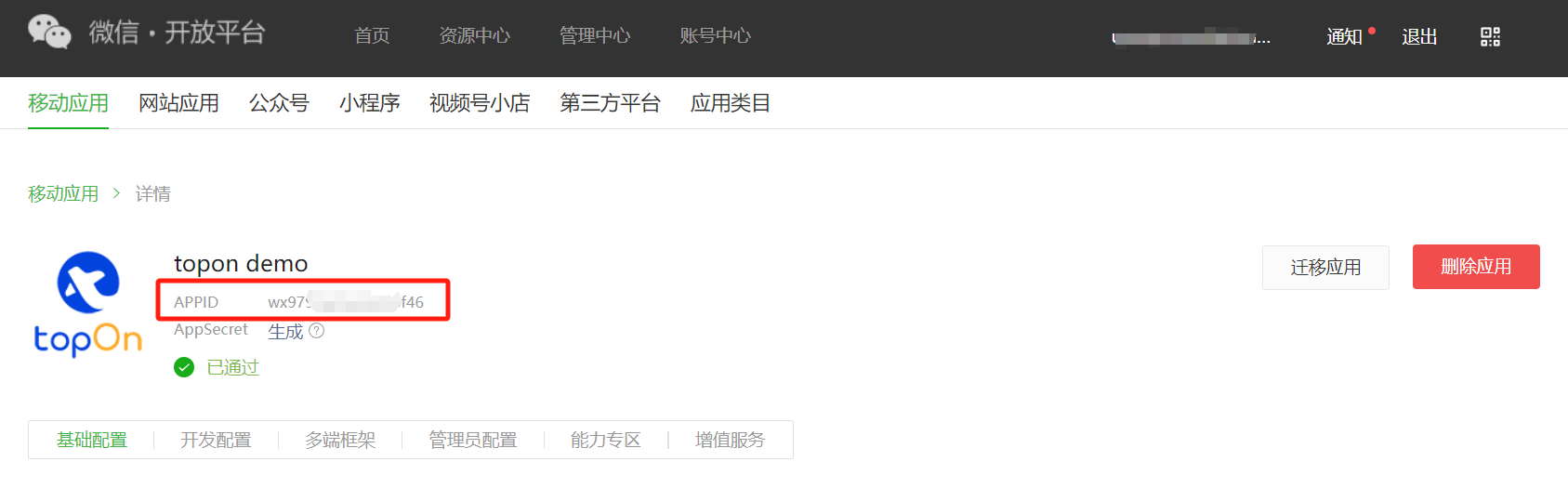
② In the WeChat Open Platform Management Center, obtain the WeChat Open Platform AppID corresponding to the app.
3.2 Embed WeChat OpenSDK in the App
Ensure that the OpenSDK version is Android 5.3.1 or above.
implementation 'com.tencent.mm.opensdk:wechat-sdk-android:+'For detailed methods and resources for embedding OpenSDK, please refer to Android Integration Guide | WeChat Open Docs.
3.3 Associate the App with the WeChat Open Platform App ID
① The WeChat Open Platform App ID for each ad platform can be set through Taku's unified configuration.
② For some ad platforms, you need to go to the corresponding dashboard to associate.
3.3.1 Taku Unified Configuration Instructions
● For Taku SDK Version >= 6.3.50
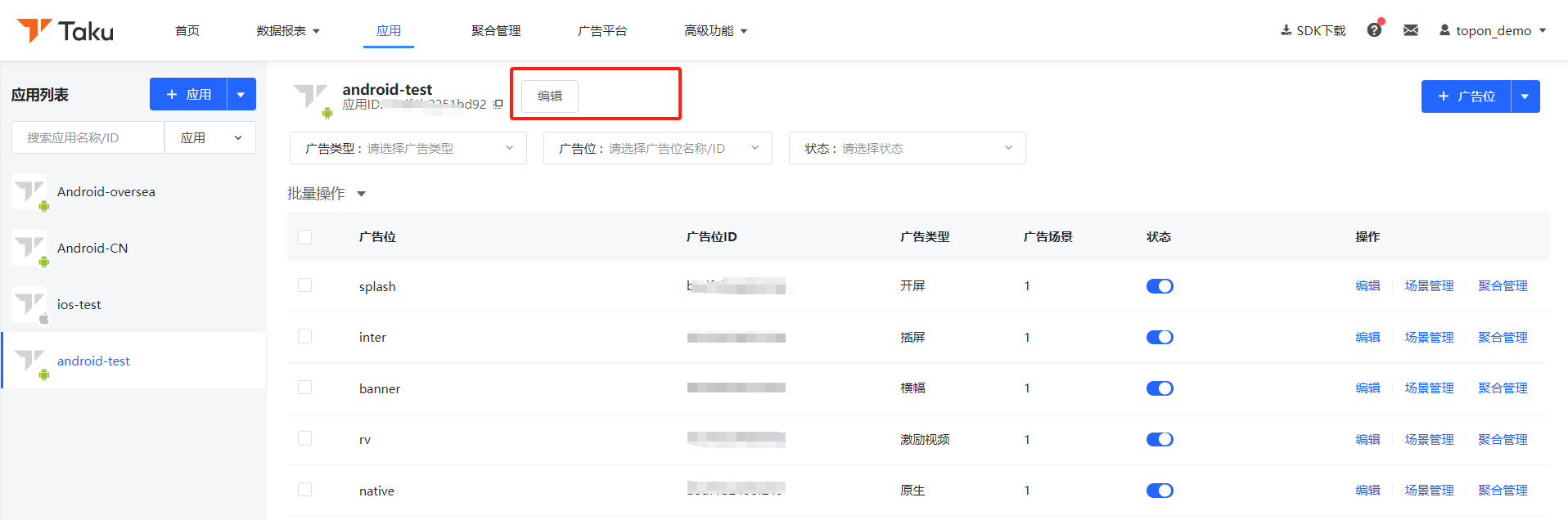
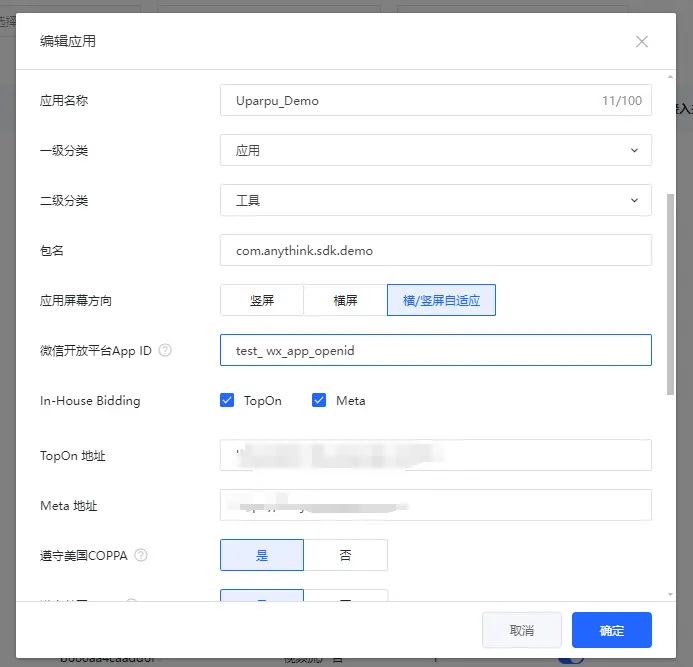
In the Taku Developer Platform, under the [Apps] module, find the app that needs to be associated with the App ID, click Edit, and then bind the WeChat Open Platform AppID with the specified app.
The specific operation is as shown below:
Note: If the WeChat Mini Program AppID has already been set via the Taku SDK API, the AppID set via the API will take precedence.
● For 6.1.50 <= Taku SDK Version < 6.3.50
Before ad loading, you need to call the code to set the WeChat Mini Program AppID via the Taku SDK API:
ATSDK.setWXAppId( "Your Wechat AppId")● For Taku SDK Version < 6.1.50
Before ad loading, you need to call the code to set the WeChat Mini Program AppID via the Taku SDK API:
Map custommap = new HashMap();
custommap.put(ATAdConst.KEY.WECHAT_APPID, "Your Wechat AppId");
....
// The CustomMap with the WeChat AppId must be set before Initialization.
ATSDK.initCustomMap(custommap);
3.3.2 Configuration Instructions for Each Ad Platform
The following is the configuration instructions for associating the WeChat Mini Program App ID for each ad platform.
| Ad Platform | Network Version | Other Notes |
|---|---|---|
| Kuaishou | 3.3.26 | The Mini Program AppID needs to be provided to Kuaishou's operations or business personnel for configuration. |
| Mintegral | 16.1.8 | Can set the WeChat Mini Program AppID through Taku's unified configuration. |
| Pangle (China) | Historical versions already supported | The WeChat AppID needs to be entered in the Pangle (China) dashboard. Android SDK Support for WeChat Mini Program/Mini Game Redirect Integration Solution |
| GDT | Historical versions already supported | The WeChat AppID needs to be entered in the Tencent dashboard. Android Support for WeChat Ecosystem Link E-Commerce Ad Redirect Integration Solution |
| YouKeYing | 2.9.0.9 | The WeChat AppID needs to be associated in the YouKeYing dashboard. |
| Sigmob | 4.6.0 | The WeChat AppID needs to be associated in the Sigmob dashboard. |
| Baidu | 9.231 | Can set the WeChat Mini Program AppID through Taku's unified configuration. |
| Taku ADX | 6.1.50 | Can set the WeChat Mini Program AppID through Taku's unified configuration. |
| VIVO | 6.1.5.1 | Can set the WeChat Mini Program AppID through Taku's unified configuration. |
3.3.3 MTG Import Notes
// Starting from SDK version 16.1.7, MTG ads support Mini Program redirect functionality. The SDK for non-Google Play markets will automatically import OpenSDK.
// If developers do not wish to use Mini Programs, they can exclude it using exclude. Example:
implementation ('com.mbridge.msdk.oversea:${adType}:${sdkVersion}'){
 exclude group: "com.tencent.mm.opensdk", module: "wechat-sdk-android"
}
// If using the Google Play market version of the SDK and you want to use the Mini Program redirect functionality, you can manually import OpenSDK.
implementation 'com.tencent.mm.opensdk:wechat-sdk-android:+';}.cls-2{fill:%230868f7;}.cls-3{fill:url(%23未命名的渐变_44);}.cls-4{fill:%23333;}%3c/style%3e%3clinearGradient%20id='未命名的渐变_8'%20x1='33.73'%20y1='100.61'%20x2='-0.03'%20y2='-1.06'%20gradientUnits='userSpaceOnUse'%3e%3cstop%20offset='0'%20stop-color='%237ae9fb'/%3e%3cstop%20offset='0.67'%20stop-color='%232b90f8'/%3e%3cstop%20offset='1'%20stop-color='%230868f7'/%3e%3c/linearGradient%3e%3clinearGradient%20id='未命名的渐变_44'%20x1='27.86'%20y1='18.67'%20x2='68.36'%20y2='22.22'%20gradientUnits='userSpaceOnUse'%3e%3cstop%20offset='0'%20stop-color='%235ac7f2'/%3e%3cstop%20offset='1'%20stop-color='%230868f7'/%3e%3c/linearGradient%3e%3c/defs%3e%3cpath%20class='cls-1'%20d='M29,28.74V81.91l-9.51-3.68v0L8.52,74A7.17,7.17,0,0,1,4,67.32V24.54A3.76,3.76,0,0,1,9.08,21Z'/%3e%3cpath%20class='cls-2'%20d='M68.09,78.07a13.15,13.15,0,0,1-17.9,12.06L29,81.91h0V28.74L50.19,37A13.17,13.17,0,0,0,68.08,25.3h0Z'/%3e%3cpath%20class='cls-3'%20d='M68.08,25.3a13.19,13.19,0,0,1-6.73,10.87A13.09,13.09,0,0,1,50.19,37L29,28.74V6A3.76,3.76,0,0,1,34.1,2.52l25.59,9.91A13.22,13.22,0,0,1,68.08,25.3Z'/%3e%3cpath%20class='cls-4'%20d='M129.06,81.76a4.33,4.33,0,0,1-3.19-1.31,4.4,4.4,0,0,1-1.31-3.24V56.86H97.65V77.21a4.36,4.36,0,0,1-1.35,3.2A4.68,4.68,0,0,1,93,81.76a4.32,4.32,0,0,1-3.19-1.31,4.37,4.37,0,0,1-1.32-3.24V27.27A4.58,4.58,0,0,1,89.83,24a4.59,4.59,0,0,1,7.82,3.27V48.15h26.91V27.27A4.58,4.58,0,0,1,125.91,24a4.59,4.59,0,0,1,7.82,3.27V77.21a4.37,4.37,0,0,1-1.36,3.2A4.65,4.65,0,0,1,129.06,81.76Z'/%3e%3cpath%20class='cls-4'%20d='M163.77,81.66c-6.57,0-11.76-1.92-15.44-5.7s-5.54-9.07-5.54-15.74a26.76,26.76,0,0,1,2.09-10.43,17.72,17.72,0,0,1,6.67-8.06,19.15,19.15,0,0,1,10.68-2.95,19,19,0,0,1,10.46,2.8,18.7,18.7,0,0,1,6.55,7.36,22.53,22.53,0,0,1,2.36,10.28A4.51,4.51,0,0,1,177,63.77H152.23a10.8,10.8,0,0,0,3.49,6.65c2,1.68,4.88,2.52,8.66,2.52a22.25,22.25,0,0,0,7.54-1.21c.74-.3,1.55-.67,2.37-1.07a3.75,3.75,0,0,1,1.84-.4,4.09,4.09,0,0,1,3,1.15,4,4,0,0,1,1.12,3,4.38,4.38,0,0,1-2.58,3.82,32.34,32.34,0,0,1-6.36,2.61A28.67,28.67,0,0,1,163.77,81.66ZM172.4,55.9a9.72,9.72,0,0,0-1.63-4.56A9.9,9.9,0,0,0,167,48a10.38,10.38,0,0,0-4.64-1.14,12,12,0,0,0-4.77,1.06,9.54,9.54,0,0,0-4.89,5.66,11.78,11.78,0,0,0-.51,2.3Z'/%3e%3cpath%20class='cls-4'%20d='M193,81.64a4.49,4.49,0,0,1-4.51-4.55V27.28A4.58,4.58,0,0,1,189.84,24a4.48,4.48,0,0,1,3.28-1.36A4.36,4.36,0,0,1,196.35,24a4.46,4.46,0,0,1,1.31,3.31V77.09a4.34,4.34,0,0,1-1.35,3.2A4.67,4.67,0,0,1,193,81.64Z'/%3e%3cpath%20class='cls-4'%20d='M263.79,81.71a5.7,5.7,0,0,1-4.2-1.74,5.76,5.76,0,0,1-1.73-4.19V27.37a4.58,4.58,0,0,1,1.35-3.27A4.59,4.59,0,0,1,267,27.37V72.53h24a4.58,4.58,0,0,1,3.27,7.82A4.66,4.66,0,0,1,291,81.71Z'/%3e%3cpath%20class='cls-4'%20d='M424.48,81.74a4.71,4.71,0,0,1-2.71-.88,5.43,5.43,0,0,1-1-1l-.07-.09-12.41-17-5.41,5v9.44a4.31,4.31,0,0,1-1.36,3.19,4.66,4.66,0,0,1-3.3,1.36A4.29,4.29,0,0,1,395,80.42a4.36,4.36,0,0,1-1.32-3.23V27.37A4.58,4.58,0,0,1,395,24.1a4.52,4.52,0,0,1,6.58.12,4.54,4.54,0,0,1,1.24,3.15V56.31l17.72-16.38.05,0a4.8,4.8,0,0,1,2.94-1.11,4.4,4.4,0,0,1,3.27,1.2,4.57,4.57,0,0,1,1.2,3.27,4.44,4.44,0,0,1-.77,2.33,7.45,7.45,0,0,1-1.43,1.65l-11,9.64,13.34,17.68a5,5,0,0,1,1,2.71,4.12,4.12,0,0,1-1.36,3.24A4.64,4.64,0,0,1,424.48,81.74Z'/%3e%3cpath%20class='cls-4'%20d='M317.93,81.76a21.5,21.5,0,1,1,21.17-21.5A21.37,21.37,0,0,1,317.93,81.76Zm0-34.1a12.61,12.61,0,1,0,12.42,12.6A12.52,12.52,0,0,0,317.93,47.66Z'/%3e%3cpath%20class='cls-4'%20d='M212.18,101.22a4.12,4.12,0,0,1-3.05-1.26,4.17,4.17,0,0,1-1.26-3.1V43.34a4.37,4.37,0,0,1,1.3-3.14,4.26,4.26,0,0,1,3.13-1.3,4.19,4.19,0,0,1,3.1,1.26,4.32,4.32,0,0,1,1.26,3.16,20.77,20.77,0,0,1,13-4.54,21.51,21.51,0,0,1,0,43,20.51,20.51,0,0,1-13-4.57V96.86a4.15,4.15,0,0,1-1.3,3.06A4.5,4.5,0,0,1,212.18,101.22Zm17.43-53.63c-6.23,0-12.93,4.11-12.93,12.72a12.73,12.73,0,0,0,25.46,0A12.71,12.71,0,0,0,229.61,47.59Z'/%3e%3cpath%20class='cls-4'%20d='M365.76,81.76a21.5,21.5,0,1,1,21.18-21.5A21.37,21.37,0,0,1,365.76,81.76Zm0-34.1a12.61,12.61,0,1,0,12.42,12.6A12.52,12.52,0,0,0,365.76,47.66Z'/%3e%3c/svg%3e)