
Self-rendering shake
You can configure the Shake feature for some ad platforms via code.
Currently, Adx, Baidu, Pangle (China), GDT, Kuaishou, Jingdong Ads, Qumeng, VIVO, Octopus, and Beizi have launched info feed Shake features.
| Ad Platform | Requires Platform Permission | Taku SDK Version Requirement | Taku SDK Rendering Needed | Taku Dashboard Config | Remarks |
|---|---|---|---|---|---|
| Adx | Yes | Taku SDK v6.2.85 and above supported | No | None | Contact Taku Operations to enable |
| Baidu | Feature is open by default, media needs to call SDK corresponding component | Taku SDK v6.2.60 and above supported | Yes | None | Refer to code setup below for integration |
| Kuaishou | Yes | Taku Android SDK v6.2.65 and above supported | No | Yes | View |
| Pangle (China) | Open by default. Can be enabled when creating Native info feed. | None | No | None | View |
| GDT | Yes | None | No | None | Contact GDT to obtain |
| Jingdong Ads | Feature is open by default, media needs to call SDK corresponding component | None | Yes | None | Refer to code setup below for integration |
| Qumeng | Feature is open by default, media needs to call SDK corresponding component | None | Yes | None | Refer to code setup below for integration |
| VIVO | Feature is open by default, media needs to call SDK corresponding component | None | Yes | None | Refer to code setup below for integration |
| Octopus | Yes | Taku SDK v6.5.36 and above supported | No | None | Contact Octopus to obtain |
| Beizi | Yes | Taku SDK v6.5.36 and above supported | No | None | Contact Beizi to obtain |
1. Ad Platform Info Feed Self-Rendering Shake Feature Usage Flow
(1) You need to apply to the ad platform for the info feed self-rendering Shake feature permission and obtain a third-party ad placement ID with this feature.
(2) Your app needs to add Shake interaction for info feed ads. When using third-party ad placements that support Shake, the info feed ad must display the "Shake" interaction. Otherwise, if the user shakes their phone without seeing the "Shake" related prompt, it will trigger the ad platform click and redirect, which does not comply with regulatory requirements. Shake interaction can refer to the Pangle (China) example:
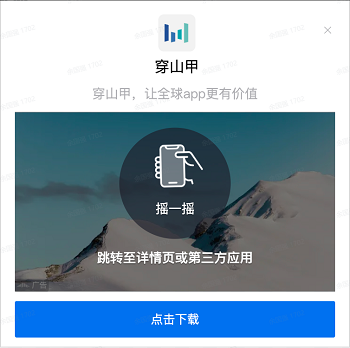
(3) If the Shake interaction display area can trigger an ad click, the suggested text configuration is Tap or Shake to navigate to the details page or third-party app.
(4) Add a new traffic group in the Taku dashboard (using the app version rule), and add the third-party ad placement ID that supports the Shake feature for the app version that has already implemented the info feed "Shake" interaction.
(5) For Shake sensitivity configuration, please contact the ad platform AM for adjustments.
2. Taku Dashboard Configuration
2.1 Kuaishou Info Feed Self-Rendering Shake Configuration
(1) When using the Kuaishou info feed self-rendering Shake feature, you need to enable the Shake switch when adding a Kuaishou info feed Ad Source.
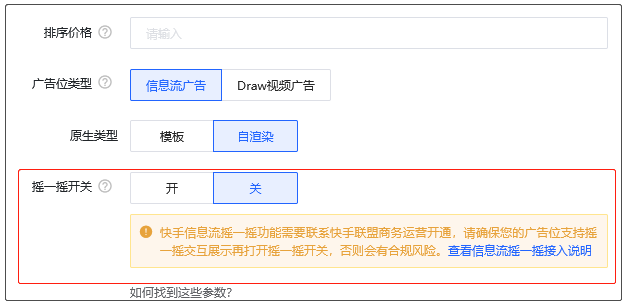
(2) If your account does not have this switch, please contact Taku to enable it.
3. Example
The Shake View needs to be rendered into the layout by the developer via code in order to trigger the Shake. Example code as follows:
    /**
     * Render the Shake component. If the ad does not support the Shake capability, null is returned. Supported platforms: Baidu, Jingdong Ads, Qumeng, VIVO.
     * @param context Context
     * @param adMaterial Ad creative
     * @param shakeViewContainer Component container
     */
    private static void renderShakeView(Context context, ATNativeMaterial adMaterial, FrameLayout shakeViewContainer) {
        int shakeViewWidth = dip2px(context, 100);  // Component width, not less than 80dp
        int shakeViewHeight = dip2px(context, 100); // Component height, not less than 80dp
        View shakeView = adMaterial.getShakeView(shakeViewWidth, shakeViewHeight, new ATShakeViewListener() {
            @Override
            public void onDismiss() {
                shakeViewContainer.setVisibility(View.GONE);
            }
        });
        if (shakeView != null) {
            if (shakeView.getParent() instanceof ViewGroup) {
                ((ViewGroup) shakeView.getParent()).removeView(shakeView);
            }
            shakeViewContainer.setVisibility(View.VISIBLE);
            FrameLayout.LayoutParams shakeViewLayoutParams = new FrameLayout.LayoutParams(shakeViewWidth, shakeViewHeight);
            shakeViewLayoutParams.gravity = Gravity.CENTER;
            shakeViewContainer.addView(shakeView, shakeViewLayoutParams);
        }
    }
4. FAQ
4.1 Does ADX support custom Shake styles:
Yes, you can add the view returned by getShakeView to the layout and then set its opacity to 0.
4.2 Can ADX sensitivity be obtained via API:
Currently, no sensitivity is exposed, and the sensitivity cannot be controlled via API. It can only be configured and adjusted by our operations team.
Note: Pangle (China), GDT, and Kuaishou platforms do not require additional code to set up the Shake View. Adx renders the Shake View by default, but developers can also control the position of the Shake View using the code above.
;}.cls-2{fill:%230868f7;}.cls-3{fill:url(%23未命名的渐变_44);}.cls-4{fill:%23333;}%3c/style%3e%3clinearGradient%20id='未命名的渐变_8'%20x1='33.73'%20y1='100.61'%20x2='-0.03'%20y2='-1.06'%20gradientUnits='userSpaceOnUse'%3e%3cstop%20offset='0'%20stop-color='%237ae9fb'/%3e%3cstop%20offset='0.67'%20stop-color='%232b90f8'/%3e%3cstop%20offset='1'%20stop-color='%230868f7'/%3e%3c/linearGradient%3e%3clinearGradient%20id='未命名的渐变_44'%20x1='27.86'%20y1='18.67'%20x2='68.36'%20y2='22.22'%20gradientUnits='userSpaceOnUse'%3e%3cstop%20offset='0'%20stop-color='%235ac7f2'/%3e%3cstop%20offset='1'%20stop-color='%230868f7'/%3e%3c/linearGradient%3e%3c/defs%3e%3cpath%20class='cls-1'%20d='M29,28.74V81.91l-9.51-3.68v0L8.52,74A7.17,7.17,0,0,1,4,67.32V24.54A3.76,3.76,0,0,1,9.08,21Z'/%3e%3cpath%20class='cls-2'%20d='M68.09,78.07a13.15,13.15,0,0,1-17.9,12.06L29,81.91h0V28.74L50.19,37A13.17,13.17,0,0,0,68.08,25.3h0Z'/%3e%3cpath%20class='cls-3'%20d='M68.08,25.3a13.19,13.19,0,0,1-6.73,10.87A13.09,13.09,0,0,1,50.19,37L29,28.74V6A3.76,3.76,0,0,1,34.1,2.52l25.59,9.91A13.22,13.22,0,0,1,68.08,25.3Z'/%3e%3cpath%20class='cls-4'%20d='M129.06,81.76a4.33,4.33,0,0,1-3.19-1.31,4.4,4.4,0,0,1-1.31-3.24V56.86H97.65V77.21a4.36,4.36,0,0,1-1.35,3.2A4.68,4.68,0,0,1,93,81.76a4.32,4.32,0,0,1-3.19-1.31,4.37,4.37,0,0,1-1.32-3.24V27.27A4.58,4.58,0,0,1,89.83,24a4.59,4.59,0,0,1,7.82,3.27V48.15h26.91V27.27A4.58,4.58,0,0,1,125.91,24a4.59,4.59,0,0,1,7.82,3.27V77.21a4.37,4.37,0,0,1-1.36,3.2A4.65,4.65,0,0,1,129.06,81.76Z'/%3e%3cpath%20class='cls-4'%20d='M163.77,81.66c-6.57,0-11.76-1.92-15.44-5.7s-5.54-9.07-5.54-15.74a26.76,26.76,0,0,1,2.09-10.43,17.72,17.72,0,0,1,6.67-8.06,19.15,19.15,0,0,1,10.68-2.95,19,19,0,0,1,10.46,2.8,18.7,18.7,0,0,1,6.55,7.36,22.53,22.53,0,0,1,2.36,10.28A4.51,4.51,0,0,1,177,63.77H152.23a10.8,10.8,0,0,0,3.49,6.65c2,1.68,4.88,2.52,8.66,2.52a22.25,22.25,0,0,0,7.54-1.21c.74-.3,1.55-.67,2.37-1.07a3.75,3.75,0,0,1,1.84-.4,4.09,4.09,0,0,1,3,1.15,4,4,0,0,1,1.12,3,4.38,4.38,0,0,1-2.58,3.82,32.34,32.34,0,0,1-6.36,2.61A28.67,28.67,0,0,1,163.77,81.66ZM172.4,55.9a9.72,9.72,0,0,0-1.63-4.56A9.9,9.9,0,0,0,167,48a10.38,10.38,0,0,0-4.64-1.14,12,12,0,0,0-4.77,1.06,9.54,9.54,0,0,0-4.89,5.66,11.78,11.78,0,0,0-.51,2.3Z'/%3e%3cpath%20class='cls-4'%20d='M193,81.64a4.49,4.49,0,0,1-4.51-4.55V27.28A4.58,4.58,0,0,1,189.84,24a4.48,4.48,0,0,1,3.28-1.36A4.36,4.36,0,0,1,196.35,24a4.46,4.46,0,0,1,1.31,3.31V77.09a4.34,4.34,0,0,1-1.35,3.2A4.67,4.67,0,0,1,193,81.64Z'/%3e%3cpath%20class='cls-4'%20d='M263.79,81.71a5.7,5.7,0,0,1-4.2-1.74,5.76,5.76,0,0,1-1.73-4.19V27.37a4.58,4.58,0,0,1,1.35-3.27A4.59,4.59,0,0,1,267,27.37V72.53h24a4.58,4.58,0,0,1,3.27,7.82A4.66,4.66,0,0,1,291,81.71Z'/%3e%3cpath%20class='cls-4'%20d='M424.48,81.74a4.71,4.71,0,0,1-2.71-.88,5.43,5.43,0,0,1-1-1l-.07-.09-12.41-17-5.41,5v9.44a4.31,4.31,0,0,1-1.36,3.19,4.66,4.66,0,0,1-3.3,1.36A4.29,4.29,0,0,1,395,80.42a4.36,4.36,0,0,1-1.32-3.23V27.37A4.58,4.58,0,0,1,395,24.1a4.52,4.52,0,0,1,6.58.12,4.54,4.54,0,0,1,1.24,3.15V56.31l17.72-16.38.05,0a4.8,4.8,0,0,1,2.94-1.11,4.4,4.4,0,0,1,3.27,1.2,4.57,4.57,0,0,1,1.2,3.27,4.44,4.44,0,0,1-.77,2.33,7.45,7.45,0,0,1-1.43,1.65l-11,9.64,13.34,17.68a5,5,0,0,1,1,2.71,4.12,4.12,0,0,1-1.36,3.24A4.64,4.64,0,0,1,424.48,81.74Z'/%3e%3cpath%20class='cls-4'%20d='M317.93,81.76a21.5,21.5,0,1,1,21.17-21.5A21.37,21.37,0,0,1,317.93,81.76Zm0-34.1a12.61,12.61,0,1,0,12.42,12.6A12.52,12.52,0,0,0,317.93,47.66Z'/%3e%3cpath%20class='cls-4'%20d='M212.18,101.22a4.12,4.12,0,0,1-3.05-1.26,4.17,4.17,0,0,1-1.26-3.1V43.34a4.37,4.37,0,0,1,1.3-3.14,4.26,4.26,0,0,1,3.13-1.3,4.19,4.19,0,0,1,3.1,1.26,4.32,4.32,0,0,1,1.26,3.16,20.77,20.77,0,0,1,13-4.54,21.51,21.51,0,0,1,0,43,20.51,20.51,0,0,1-13-4.57V96.86a4.15,4.15,0,0,1-1.3,3.06A4.5,4.5,0,0,1,212.18,101.22Zm17.43-53.63c-6.23,0-12.93,4.11-12.93,12.72a12.73,12.73,0,0,0,25.46,0A12.71,12.71,0,0,0,229.61,47.59Z'/%3e%3cpath%20class='cls-4'%20d='M365.76,81.76a21.5,21.5,0,1,1,21.18-21.5A21.37,21.37,0,0,1,365.76,81.76Zm0-34.1a12.61,12.61,0,1,0,12.42,12.6A12.52,12.52,0,0,0,365.76,47.66Z'/%3e%3c/svg%3e)