
Template advertising
1. Introduction
Template info feed ads are relatively simple to use in native ads. Developers do not need to define the internal ad UI layout. The SDK will provide a fully rendered View for the developer to place at the specified position for display. As shown in the screenshots below:
| Fixed Position Display | Info Feed List Display |
|---|---|
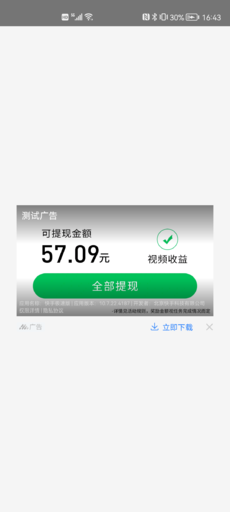 |
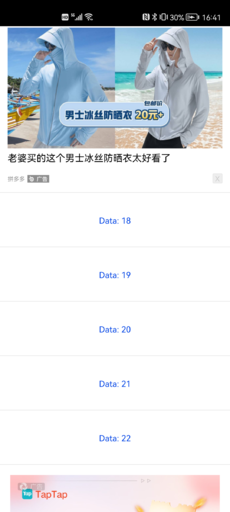 |
2. Integration Suggestions
(1) When the app starts, use ATNative.makeAdRequest to execute ad loading. Request ads in advance so that ads can be quickly displayed when needed.
(2) It is recommended to call entryAdScenario(placementId,scenarioId) after entering a displayable ad scenario to count the cache status of the current Ad Placement. For detailed usage of statistics, see Ad Scenarios for distinguishing data across different business scenarios.
(3) Do not execute the ad loading method in the onNativeAdLoadFail callback, otherwise it will cause many unnecessary requests and may cause the app to lag.
(4) Get the ad object via ATNative.getNativeAd at the position where native ads need to be displayed to check whether it is null:
- If null: Re-execute
ATNative.makeAdRequestto load ads. - If not null: Display the
NativeAdad object. At this point, you can directly callATNative.makeAdRequestagain to preload the next ad (as long as you have calledATNative.getNativeAd, you can directly preload the next ad).
(5) It is recommended to configure a preset strategy to improve the ad loading efficiency during the first cold start. For specific instructions and integration tutorials, see SDK Preset Strategy Instructions.
3. Sample Code
For detailed sample code, refer to Demo: Taku SDK Demo. For displaying a single info feed ad, refer to the NativeAdActivity.java class in the Demo. For info feed list integration, refer to the NativeListActivity.java class in the Demo.
3.1 Loading Ads
Note:
- Template ads have their own aspect ratios, which can be viewed in the ad platform dashboard. Try to select templates with the same or similar aspect ratios in the ad platform dashboard, and pass the width and height with that aspect ratio in the code for loading and displaying ads to achieve the best display effect.
- The width and height of ATNativeAdView must be consistent with the width and height corresponding to ATAdConst.KEY.AD_WIDTH and ATAdConst.KEY.AD_HEIGHT, otherwise display may be incomplete or too small.
ATNative atNative;
NativeAd mNativeAd;

int adViewWidth;
int adViewHeight;

public void loadNativeAd() {
  if (atNative == null) {
     // Initialize the ad loading object
      atNative = new ATNative(this, nativeTakuPlacementID, new ATNativeNetworkListener() {
                @Override
                public void onNativeAdLoaded() {
                    Log.i(TAG, "onNativeAdLoaded");
                }

                @Override
                public void onNativeAdLoadFail(AdError adError) {
                    // Note: Do not execute the ad loading method in this callback for retry, otherwise it will cause many unnecessary requests and may cause the app to lag.
                    // AdError, please refer to https://newdocs.takuad.com/docs/55cxNt
                    Log.i(TAG, "onNativeAdLoadFail:" + adError.getFullErrorInfo());
                }
            });
   }

  Map localMap = new HashMap<>();
    localMap.put(ATAdConst.KEY.AD_WIDTH, adViewWidth);// Unit: px, the width of the desired ad display
    localMap.put(ATAdConst.KEY.AD_HEIGHT, adViewHeight);// Unit: px, the height of the desired ad display

  // The following can set adaptive height for specific platforms (the width must be set as a prerequisite).
  // Pangle (China)
    localMap.put(TTATConst.NATIVE_AD_IMAGE_HEIGHT, 0);
  // Tencent Ads, ADSize.AUTO_HEIGHT value is -2
    localMap.put(GDTATConst.AD_HEIGHT, ADSize.AUTO_HEIGHT);

    atNative.setLocalExtra(localMap);
  // Initiate ad request
    atNative.makeAdRequest();

}
3.2 Displaying Ads
ATNativeAdView mATNativeAdView; // Container that must be created for rendering ads.

public void showNativeAd(ViewGroup adContainer, int adViewWidth) {
     /*
     To count scenario arrival rate, related info can be found at "https://help.takuad.com/docs/1RWLAv"
     Call the “enter ad scenario” method when the ad triggering conditions are met, for example:
     ** If the ad scenario is to display an ad after a cleanup is finished, call it when the cleanup is finished;
     * 1. First call "entryAdScenario"
     * 2. Then call "ATNative#checkAdStatus#isReady" to check if it is displayable
     * 3. Finally call "getNativeAd" to display
     * 4. Passing the scenario ID into scenario will only result in data reaching the dashboard funnel report (optional).
     */
  ATNative.entryAdScenario("your Native placementID", "your scenarioID");
  if (atNative== null){
      return;
  }
  if(!atNative.checkAdStatus().isReady()){
    return;
  }
  if (mATNativeAdView == null) {
     mATNativeAdView = findViewById(R.id.native_ad_view); // Can be defined in xml layout.
  }

  NativeAd nativeAd = atNative.getNativeAd();
  // After calling getNativeAd, developers can directly use ATNative#makeAdRequest to initiate preloading of the next ad.
  // loadNativeAd();
    if (nativeAd != null) {
      if (mNativeAd != null) {
           mNativeAd.destory();
      }

      mNativeAd = nativeAd;
            mNativeAd.setNativeEventListener(new ATNativeEventListener() {
            @Override
            public void onAdImpressed(ATNativeAdView view, ATAdInfo atAdInfo) {
                // ATAdInfo can distinguish ad platforms and obtain the ad placement ID of the ad platform, etc.
                // Please refer to https://newdocs.takuad.com/docs/JSLSJN
                Log.i(TAG, "native ad onAdImpressed:\n" + atAdInfo.toString());
            }

            @Override
            public void onAdClicked(ATNativeAdView view, ATAdInfo atAdInfo) {
                Log.i(TAG, "native ad onAdClicked:\n" + atAdInfo.toString());
            }

            @Override
            public void onAdVideoStart(ATNativeAdView view) {
                Log.i(TAG, "native ad onAdVideoStart");
            }

            @Override
            public void onAdVideoEnd(ATNativeAdView view) {
                Log.i(TAG, "native ad onAdVideoEnd");
            }

            @Override
            public void onAdVideoProgress(ATNativeAdView view, int progress) {
                Log.i(TAG, "native ad onAdVideoProgress:" + progress);
            }
        });

     ATNativePrepareInfo nativePrepareInfo = null;

      if (!mNativeAd.isNativeExpress()) {
            // Self-Rendering (If self-rendering ads also need to be supported, refer to the self-rendering ad integration method.)
            ....
       } else {
           // Template Rendering (This step needs to be implemented for template rendering.)
            mNativeAd.renderAdContainer(mATNativeAdView, null);
       }

        mNativeAd.prepare(mATNativeAdView, nativePrepareInfo);
    }
}
3.3 Close Button Instructions
Before rendering NativeAd, developers can set the close button listener for template ads.
 mNativeAd.setDislikeCallbackListener(new ATNativeDislikeListener() {
                @Override
                public void onAdCloseButtonClick(ATNativeAdView view, ATAdInfo entity) {
                    Log.i(TAG, "native ad onAdCloseButtonClick");
                      // Here, the developer can implement the removal of the ad View.
                }
});
3.4 Destroying Ads
public void destroyAd() {
    if (mNativeAd != null) {
        mNativeAd.destory();
    }
}
For detailed template ad sample code, refer to the NativeAdActivity class in Demo.
;}.cls-2{fill:%230868f7;}.cls-3{fill:url(%23未命名的渐变_44);}.cls-4{fill:%23333;}%3c/style%3e%3clinearGradient%20id='未命名的渐变_8'%20x1='33.73'%20y1='100.61'%20x2='-0.03'%20y2='-1.06'%20gradientUnits='userSpaceOnUse'%3e%3cstop%20offset='0'%20stop-color='%237ae9fb'/%3e%3cstop%20offset='0.67'%20stop-color='%232b90f8'/%3e%3cstop%20offset='1'%20stop-color='%230868f7'/%3e%3c/linearGradient%3e%3clinearGradient%20id='未命名的渐变_44'%20x1='27.86'%20y1='18.67'%20x2='68.36'%20y2='22.22'%20gradientUnits='userSpaceOnUse'%3e%3cstop%20offset='0'%20stop-color='%235ac7f2'/%3e%3cstop%20offset='1'%20stop-color='%230868f7'/%3e%3c/linearGradient%3e%3c/defs%3e%3cpath%20class='cls-1'%20d='M29,28.74V81.91l-9.51-3.68v0L8.52,74A7.17,7.17,0,0,1,4,67.32V24.54A3.76,3.76,0,0,1,9.08,21Z'/%3e%3cpath%20class='cls-2'%20d='M68.09,78.07a13.15,13.15,0,0,1-17.9,12.06L29,81.91h0V28.74L50.19,37A13.17,13.17,0,0,0,68.08,25.3h0Z'/%3e%3cpath%20class='cls-3'%20d='M68.08,25.3a13.19,13.19,0,0,1-6.73,10.87A13.09,13.09,0,0,1,50.19,37L29,28.74V6A3.76,3.76,0,0,1,34.1,2.52l25.59,9.91A13.22,13.22,0,0,1,68.08,25.3Z'/%3e%3cpath%20class='cls-4'%20d='M129.06,81.76a4.33,4.33,0,0,1-3.19-1.31,4.4,4.4,0,0,1-1.31-3.24V56.86H97.65V77.21a4.36,4.36,0,0,1-1.35,3.2A4.68,4.68,0,0,1,93,81.76a4.32,4.32,0,0,1-3.19-1.31,4.37,4.37,0,0,1-1.32-3.24V27.27A4.58,4.58,0,0,1,89.83,24a4.59,4.59,0,0,1,7.82,3.27V48.15h26.91V27.27A4.58,4.58,0,0,1,125.91,24a4.59,4.59,0,0,1,7.82,3.27V77.21a4.37,4.37,0,0,1-1.36,3.2A4.65,4.65,0,0,1,129.06,81.76Z'/%3e%3cpath%20class='cls-4'%20d='M163.77,81.66c-6.57,0-11.76-1.92-15.44-5.7s-5.54-9.07-5.54-15.74a26.76,26.76,0,0,1,2.09-10.43,17.72,17.72,0,0,1,6.67-8.06,19.15,19.15,0,0,1,10.68-2.95,19,19,0,0,1,10.46,2.8,18.7,18.7,0,0,1,6.55,7.36,22.53,22.53,0,0,1,2.36,10.28A4.51,4.51,0,0,1,177,63.77H152.23a10.8,10.8,0,0,0,3.49,6.65c2,1.68,4.88,2.52,8.66,2.52a22.25,22.25,0,0,0,7.54-1.21c.74-.3,1.55-.67,2.37-1.07a3.75,3.75,0,0,1,1.84-.4,4.09,4.09,0,0,1,3,1.15,4,4,0,0,1,1.12,3,4.38,4.38,0,0,1-2.58,3.82,32.34,32.34,0,0,1-6.36,2.61A28.67,28.67,0,0,1,163.77,81.66ZM172.4,55.9a9.72,9.72,0,0,0-1.63-4.56A9.9,9.9,0,0,0,167,48a10.38,10.38,0,0,0-4.64-1.14,12,12,0,0,0-4.77,1.06,9.54,9.54,0,0,0-4.89,5.66,11.78,11.78,0,0,0-.51,2.3Z'/%3e%3cpath%20class='cls-4'%20d='M193,81.64a4.49,4.49,0,0,1-4.51-4.55V27.28A4.58,4.58,0,0,1,189.84,24a4.48,4.48,0,0,1,3.28-1.36A4.36,4.36,0,0,1,196.35,24a4.46,4.46,0,0,1,1.31,3.31V77.09a4.34,4.34,0,0,1-1.35,3.2A4.67,4.67,0,0,1,193,81.64Z'/%3e%3cpath%20class='cls-4'%20d='M263.79,81.71a5.7,5.7,0,0,1-4.2-1.74,5.76,5.76,0,0,1-1.73-4.19V27.37a4.58,4.58,0,0,1,1.35-3.27A4.59,4.59,0,0,1,267,27.37V72.53h24a4.58,4.58,0,0,1,3.27,7.82A4.66,4.66,0,0,1,291,81.71Z'/%3e%3cpath%20class='cls-4'%20d='M424.48,81.74a4.71,4.71,0,0,1-2.71-.88,5.43,5.43,0,0,1-1-1l-.07-.09-12.41-17-5.41,5v9.44a4.31,4.31,0,0,1-1.36,3.19,4.66,4.66,0,0,1-3.3,1.36A4.29,4.29,0,0,1,395,80.42a4.36,4.36,0,0,1-1.32-3.23V27.37A4.58,4.58,0,0,1,395,24.1a4.52,4.52,0,0,1,6.58.12,4.54,4.54,0,0,1,1.24,3.15V56.31l17.72-16.38.05,0a4.8,4.8,0,0,1,2.94-1.11,4.4,4.4,0,0,1,3.27,1.2,4.57,4.57,0,0,1,1.2,3.27,4.44,4.44,0,0,1-.77,2.33,7.45,7.45,0,0,1-1.43,1.65l-11,9.64,13.34,17.68a5,5,0,0,1,1,2.71,4.12,4.12,0,0,1-1.36,3.24A4.64,4.64,0,0,1,424.48,81.74Z'/%3e%3cpath%20class='cls-4'%20d='M317.93,81.76a21.5,21.5,0,1,1,21.17-21.5A21.37,21.37,0,0,1,317.93,81.76Zm0-34.1a12.61,12.61,0,1,0,12.42,12.6A12.52,12.52,0,0,0,317.93,47.66Z'/%3e%3cpath%20class='cls-4'%20d='M212.18,101.22a4.12,4.12,0,0,1-3.05-1.26,4.17,4.17,0,0,1-1.26-3.1V43.34a4.37,4.37,0,0,1,1.3-3.14,4.26,4.26,0,0,1,3.13-1.3,4.19,4.19,0,0,1,3.1,1.26,4.32,4.32,0,0,1,1.26,3.16,20.77,20.77,0,0,1,13-4.54,21.51,21.51,0,0,1,0,43,20.51,20.51,0,0,1-13-4.57V96.86a4.15,4.15,0,0,1-1.3,3.06A4.5,4.5,0,0,1,212.18,101.22Zm17.43-53.63c-6.23,0-12.93,4.11-12.93,12.72a12.73,12.73,0,0,0,25.46,0A12.71,12.71,0,0,0,229.61,47.59Z'/%3e%3cpath%20class='cls-4'%20d='M365.76,81.76a21.5,21.5,0,1,1,21.18-21.5A21.37,21.37,0,0,1,365.76,81.76Zm0-34.1a12.61,12.61,0,1,0,12.42,12.6A12.52,12.52,0,0,0,365.76,47.66Z'/%3e%3c/svg%3e)