
请输入
菜单
自定义横幅广告
1. 说明
使用横幅广告位配置原生广告。
请前往这里查看本功能的支持范围
2. 如何使用
1. 管理后台创建横幅广告位,并添加或编辑支持广告样式混用的广告源
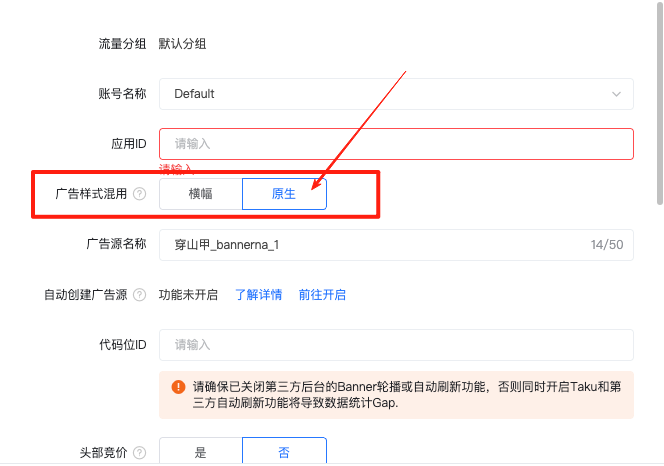
2. 如果后台选择由Taku渲染(SDK渲染),此时UI元素无法自行设置布局,您需要正确指定banner容器大小即可,无需修改代码,可跳过以下步骤。
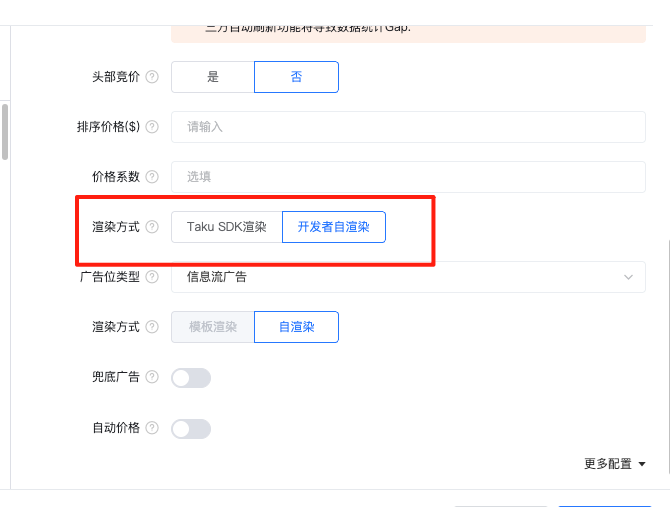
3. 如果后台选择自渲染,需要额外集成代码,请先阅读本注意事项后再进行代码对接。
若您后台配置采用自渲染方案,请注意以下几点:
拿到UI元素自行配置布局,调用展示若没有触发show回调,则表示您渲染的UI元素不够,或是布局存在问题,导致广告平台判定为无效展示,您需要根据实际情况调整以满足广告平台要求。
没在代码实现自渲染返回广告View,则会默认用SDK内置的布局样式进行渲染。
有在代码设置自渲染返回广告View时,则广告背景默认是全透明。
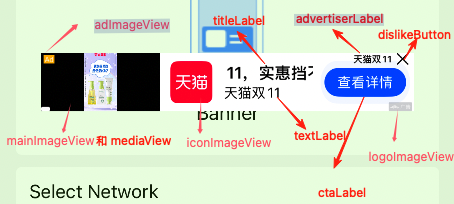
对下图的mainImageView或mediaView的处理,它们的布局是一致的,当mediaView有值时,布局mediaView并显示在最上方。
4.建议渲染的元素与图例说明如下:
广告元素有些必须渲染,有些则是可选渲染,详情请参考本篇末尾
广告元素字段不一定有值,使用前需要判空
3. 示例代码
请注意,自渲染的布局不要超出后台选择 banner 的尺寸,否则会导致无法响应点击事件!
objc
#import <Masonry/Masonry.h>

- (void)showBanner {
    // 展示前判断广告是否准备好
    if ([[ATAdManager sharedManager] bannerAdReadyForPlacementID:@"your banner placementID"]) {
         // 移除可能存在的旧BannerView
        NSInteger tag = 3333;
        [[self.view viewWithTag:tag] removeFromSuperview];
         //Retrieve banner view

        ATShowConfig *showConfig = ATShowConfig.new;
        //若没有场景配置,使用默认场景可传入空字符串
        showConfig.scene = @"your scene id";
        //展示时透传参数
        showConfig.showCustomExt = @"testShowCustomExt";
        __weak __typeof(self)weakSelf = self;

        ATBannerView *bannerView = [[ATAdManager sharedManager] retrieveBannerViewForPlacementID:@"your banner ad id"
                                                                config:showConfig
                                                                nativeMixBannerViewBlock:^(ATNativeBannerView * _Nonnull nativeBannerView) {
                                                                //Taku后台选择自渲染时,由您进行ATNativeBannerView的约束设置 ,选择Taku渲染则不会回调
                                                                        [weakSelf developerSlefRender:nativeBannerView];
                                                               }];

        if (bannerView != nil) {
            bannerView.delegate = self;
            bannerView.presentingViewController = self;
            bannerView.translatesAutoresizingMaskIntoConstraints = NO;
            bannerView.tag = tag;
            [self.view addSubview:bannerView];
            //Layour banner
            [self.view addConstraint:[NSLayoutConstraint constraintWithItem:self.view attribute:NSLayoutAttributeCenterX relatedBy:NSLayoutRelationEqual toItem:bannerView attribute:NSLayoutAttributeCenterX multiplier:1.0f constant:.0f]];
            [self.view addConstraint:[NSLayoutConstraint constraintWithItem:bannerView attribute:NSLayoutAttributeTop relatedBy:NSLayoutRelationEqual toItem:self.view attribute:NSLayoutAttributeTop multiplier:1.0f constant:CGRectGetHeight([UIApplication sharedApplication].statusBarFrame) + CGRectGetHeight(self.navigationController.navigationBar.frame)]];
            [self.view addConstraint:[NSLayoutConstraint constraintWithItem:bannerView attribute:NSLayoutAttributeWidth relatedBy:NSLayoutRelationEqual toItem:nil attribute:NSLayoutAttributeNotAnAttribute multiplier:1.0f constant:_adSize.width]];
            [self.view addConstraint:[NSLayoutConstraint constraintWithItem:bannerView attribute:NSLayoutAttributeHeight relatedBy:NSLayoutRelationEqual toItem:nil attribute:NSLayoutAttributeNotAnAttribute multiplier:1.0f constant:_adSize.height]];
        } else {
        NSLog(@"Banner ad's not ready for placementID:%@", @"your banner placementID");
    }
}

 - (void)developerSlefRender:(ATNativeBannerView *)nativeBannerView {

    // 只渲染部分作为示例
    [nativeBannerView mas_remakeConstraints:^(MASConstraintMaker *make) {
        make.width.mas_equalTo(350);
        make.height.mas_equalTo(150);
        make.center.mas_equalTo(nativeBannerView.superview);
    }];

    [nativeBannerView.textLabel mas_remakeConstraints:^(MASConstraintMaker *make) {
        make.left.mas_equalTo(nativeBannerView);
        make.right.mas_equalTo(nativeBannerView);
        make.height.mas_equalTo(30);
        make.bottom.mas_equalTo(nativeBannerView.mas_bottom).offset(-5);
    }];

    [nativeBannerView.titleLabel mas_remakeConstraints:^(MASConstraintMaker *make) {
        make.left.mas_equalTo(nativeBannerView);
        make.right.mas_equalTo(nativeBannerView);
        make.height.mas_equalTo(30);
        make.bottom.mas_equalTo(nativeBannerView.textLabel.mas_top).offset(-5);
    }];

    //布局默认"广告"logo
    [nativeBannerView.adLabel mas_remakeConstraints:^(MASConstraintMaker *make) {
        make.top.mas_equalTo(nativeBannerView);
        make.right.mas_equalTo(nativeBannerView);
        make.height.mas_equalTo(30);
        make.width.mas_equalTo(50);
    }];

    // 获取广告平台logo原始对象,可能获取到"广告"字样的视图,这是因为部分平台的 logo 对象获取失败了。
    id networkLogoView = nativeBannerView.netWorkOptionView;
    // SDK>= 6.4.92 布局广告平台的logo,可能无法正确获取,或者其内容不符合预期,因此需要判断。请注意仍然不能保证平台的logo正常显示,因此建议至少兜底显示adLabel对象
    if (networkLogoView && ([networkLogoView isKindOfClass:UIImageView.class]) && ((UIImageView *)networkLogoView).image) {
        nativeBannerView.adLabel.hidden = YES;

        [nativeBannerView.netWorkOptionView mas_remakeConstraints:^(MASConstraintMaker *make) {
            make.top.mas_equalTo(nativeBannerView);
            make.right.mas_equalTo(nativeBannerView);
            make.height.mas_equalTo(30);
            make.width.mas_equalTo(50);
        }];

        [nativeBannerView bringSubviewToFront:nativeBannerView.netWorkOptionView];
    }

    // 添加点击注册控件
    NSMutableArray *regisArray = [NSMutableArray array];
    if (nativeBannerView.textLabel) {
        [regisArray addObject:nativeBannerView.textLabel];
    }

    if (nativeBannerView.titleLabel) {
        [regisArray addObject:nativeBannerView.titleLabel];
    }
    [nativeBannerView registerClickableViewArray:regisArray];
}
4. UI元素列表
对于建议渲染的组件,如果您选择不渲染,需要确认该广告平台的展示曝光回调是否正常触发。
| API元素 | 类型 | 是否渲染 | 渲染要求说明 |
|---|---|---|---|
| titleLabel (对应title) | UILabel | 建议渲染 | 广告标题,建议显示 |
| textLabel (对应mainText) | UILabel | 可选 | 广告描述文字,根据UI空间决定 |
| ctaLabel (对应ctaText) | UILabel | 可选 | 行动号召按钮文字 |
| advertiserLabel (对应advertiser) | UILabel | 条件必选 | 使用Yandex平台时必须渲染 |
| iconImageView (对应iconUrl/icon) | UIImageView | 建议渲染 | 广告图标,建议显示 |
| logoImageView | UIImageView | 条件必选 | 6.4.92版本以上改用netWorkOptionView,请参考netWorkOptionView字段说明 |
| mainImageView (对应imageUrl/mainImage) | UIImageView | 建议渲染 | 不渲染需确认展示曝光回调 |
| adImageView | UIImageView | 建议渲染 | 广告"Ad"标识图片 |
| ratingLabel (对应rating) | UILabel | 可选 | 评分信息 |
| sponsorLabel | UILabel | 可选 | 赞助商信息 |
| domainLabel (对应domain) | UILabel | 条件必选 | 仅Yandex平台必须渲染 |
| warningLabel (对应warning) | UILabel | 条件必选 | 仅Yandex平台必须渲染 |
| dislikeButton | UIButton | 建议渲染 | 通用关闭按钮,建议保留 |
| netWorkMediaView (对应videoUrl) | UIView | 建议渲染 | 视频广告时建议添加,不渲染需确认展示曝光回调 |
| netWorkMediaBackView | UIView | 可选 | 媒体视图的背景,当没有MediaView和主图mainImageView时,才会创建这个视图 |
| netWorkOptionView | UIView | 建议渲染 | 广告平台logo视图,如果不为空,建议渲染,同时不建议隐藏adLabel,因为即使本字段有值也可能没有图片 |
| adLabel | UILabel | 默认渲染 | "广告"字样标识,用于兜底无法获取广告平台 logo 图片或者 logo view 对象的情况,不建议隐藏 |
上一个
横幅广告
下一个
原生广告
最近修改: 2025-12-09Powered by;}.cls-2{fill:%230868f7;}.cls-3{fill:url(%23未命名的渐变_44);}.cls-4{fill:%23333;}%3c/style%3e%3clinearGradient%20id='未命名的渐变_8'%20x1='33.73'%20y1='100.61'%20x2='-0.03'%20y2='-1.06'%20gradientUnits='userSpaceOnUse'%3e%3cstop%20offset='0'%20stop-color='%237ae9fb'/%3e%3cstop%20offset='0.67'%20stop-color='%232b90f8'/%3e%3cstop%20offset='1'%20stop-color='%230868f7'/%3e%3c/linearGradient%3e%3clinearGradient%20id='未命名的渐变_44'%20x1='27.86'%20y1='18.67'%20x2='68.36'%20y2='22.22'%20gradientUnits='userSpaceOnUse'%3e%3cstop%20offset='0'%20stop-color='%235ac7f2'/%3e%3cstop%20offset='1'%20stop-color='%230868f7'/%3e%3c/linearGradient%3e%3c/defs%3e%3cpath%20class='cls-1'%20d='M29,28.74V81.91l-9.51-3.68v0L8.52,74A7.17,7.17,0,0,1,4,67.32V24.54A3.76,3.76,0,0,1,9.08,21Z'/%3e%3cpath%20class='cls-2'%20d='M68.09,78.07a13.15,13.15,0,0,1-17.9,12.06L29,81.91h0V28.74L50.19,37A13.17,13.17,0,0,0,68.08,25.3h0Z'/%3e%3cpath%20class='cls-3'%20d='M68.08,25.3a13.19,13.19,0,0,1-6.73,10.87A13.09,13.09,0,0,1,50.19,37L29,28.74V6A3.76,3.76,0,0,1,34.1,2.52l25.59,9.91A13.22,13.22,0,0,1,68.08,25.3Z'/%3e%3cpath%20class='cls-4'%20d='M129.06,81.76a4.33,4.33,0,0,1-3.19-1.31,4.4,4.4,0,0,1-1.31-3.24V56.86H97.65V77.21a4.36,4.36,0,0,1-1.35,3.2A4.68,4.68,0,0,1,93,81.76a4.32,4.32,0,0,1-3.19-1.31,4.37,4.37,0,0,1-1.32-3.24V27.27A4.58,4.58,0,0,1,89.83,24a4.59,4.59,0,0,1,7.82,3.27V48.15h26.91V27.27A4.58,4.58,0,0,1,125.91,24a4.59,4.59,0,0,1,7.82,3.27V77.21a4.37,4.37,0,0,1-1.36,3.2A4.65,4.65,0,0,1,129.06,81.76Z'/%3e%3cpath%20class='cls-4'%20d='M163.77,81.66c-6.57,0-11.76-1.92-15.44-5.7s-5.54-9.07-5.54-15.74a26.76,26.76,0,0,1,2.09-10.43,17.72,17.72,0,0,1,6.67-8.06,19.15,19.15,0,0,1,10.68-2.95,19,19,0,0,1,10.46,2.8,18.7,18.7,0,0,1,6.55,7.36,22.53,22.53,0,0,1,2.36,10.28A4.51,4.51,0,0,1,177,63.77H152.23a10.8,10.8,0,0,0,3.49,6.65c2,1.68,4.88,2.52,8.66,2.52a22.25,22.25,0,0,0,7.54-1.21c.74-.3,1.55-.67,2.37-1.07a3.75,3.75,0,0,1,1.84-.4,4.09,4.09,0,0,1,3,1.15,4,4,0,0,1,1.12,3,4.38,4.38,0,0,1-2.58,3.82,32.34,32.34,0,0,1-6.36,2.61A28.67,28.67,0,0,1,163.77,81.66ZM172.4,55.9a9.72,9.72,0,0,0-1.63-4.56A9.9,9.9,0,0,0,167,48a10.38,10.38,0,0,0-4.64-1.14,12,12,0,0,0-4.77,1.06,9.54,9.54,0,0,0-4.89,5.66,11.78,11.78,0,0,0-.51,2.3Z'/%3e%3cpath%20class='cls-4'%20d='M193,81.64a4.49,4.49,0,0,1-4.51-4.55V27.28A4.58,4.58,0,0,1,189.84,24a4.48,4.48,0,0,1,3.28-1.36A4.36,4.36,0,0,1,196.35,24a4.46,4.46,0,0,1,1.31,3.31V77.09a4.34,4.34,0,0,1-1.35,3.2A4.67,4.67,0,0,1,193,81.64Z'/%3e%3cpath%20class='cls-4'%20d='M263.79,81.71a5.7,5.7,0,0,1-4.2-1.74,5.76,5.76,0,0,1-1.73-4.19V27.37a4.58,4.58,0,0,1,1.35-3.27A4.59,4.59,0,0,1,267,27.37V72.53h24a4.58,4.58,0,0,1,3.27,7.82A4.66,4.66,0,0,1,291,81.71Z'/%3e%3cpath%20class='cls-4'%20d='M424.48,81.74a4.71,4.71,0,0,1-2.71-.88,5.43,5.43,0,0,1-1-1l-.07-.09-12.41-17-5.41,5v9.44a4.31,4.31,0,0,1-1.36,3.19,4.66,4.66,0,0,1-3.3,1.36A4.29,4.29,0,0,1,395,80.42a4.36,4.36,0,0,1-1.32-3.23V27.37A4.58,4.58,0,0,1,395,24.1a4.52,4.52,0,0,1,6.58.12,4.54,4.54,0,0,1,1.24,3.15V56.31l17.72-16.38.05,0a4.8,4.8,0,0,1,2.94-1.11,4.4,4.4,0,0,1,3.27,1.2,4.57,4.57,0,0,1,1.2,3.27,4.44,4.44,0,0,1-.77,2.33,7.45,7.45,0,0,1-1.43,1.65l-11,9.64,13.34,17.68a5,5,0,0,1,1,2.71,4.12,4.12,0,0,1-1.36,3.24A4.64,4.64,0,0,1,424.48,81.74Z'/%3e%3cpath%20class='cls-4'%20d='M317.93,81.76a21.5,21.5,0,1,1,21.17-21.5A21.37,21.37,0,0,1,317.93,81.76Zm0-34.1a12.61,12.61,0,1,0,12.42,12.6A12.52,12.52,0,0,0,317.93,47.66Z'/%3e%3cpath%20class='cls-4'%20d='M212.18,101.22a4.12,4.12,0,0,1-3.05-1.26,4.17,4.17,0,0,1-1.26-3.1V43.34a4.37,4.37,0,0,1,1.3-3.14,4.26,4.26,0,0,1,3.13-1.3,4.19,4.19,0,0,1,3.1,1.26,4.32,4.32,0,0,1,1.26,3.16,20.77,20.77,0,0,1,13-4.54,21.51,21.51,0,0,1,0,43,20.51,20.51,0,0,1-13-4.57V96.86a4.15,4.15,0,0,1-1.3,3.06A4.5,4.5,0,0,1,212.18,101.22Zm17.43-53.63c-6.23,0-12.93,4.11-12.93,12.72a12.73,12.73,0,0,0,25.46,0A12.71,12.71,0,0,0,229.61,47.59Z'/%3e%3cpath%20class='cls-4'%20d='M365.76,81.76a21.5,21.5,0,1,1,21.18-21.5A21.37,21.37,0,0,1,365.76,81.76Zm0-34.1a12.61,12.61,0,1,0,12.42,12.6A12.52,12.52,0,0,0,365.76,47.66Z'/%3e%3c/svg%3e)
大纲